Inner workings of home network
These days, virtually every household has a router setup at home, where multiple devices are connected within the home network. Devices…
These days, virtually every household has a router setup at home, where multiple devices are connected within the home network. Devices connected behind the router are assigned private network IP addresses, which typically are in the range of 192.X.X.X, 172.X.X.X or 10.X.X.X.
$ ifconfig
...
wlp2s0: flags=4163<UP,BROADCAST,RUNNING,MULTICAST>  mtu 1500
        inet 192.168.1.64  netmask 255.255.255.0  broadcast 192.168.1.255
These addresses are only visible within the devices under the umbrella of your home network. From the outside, i.e., the internet, home network internal is completely hidden — all the outsider sees is a single device with a single IP address. And yet, every device behind the home network can talk to the outside world independently with no interference. If you think about it, this is quite amazing. So, what kind of magic does your home router do?
The essence of this technology is called network address translation (NAT). The picture below shows what NAT does
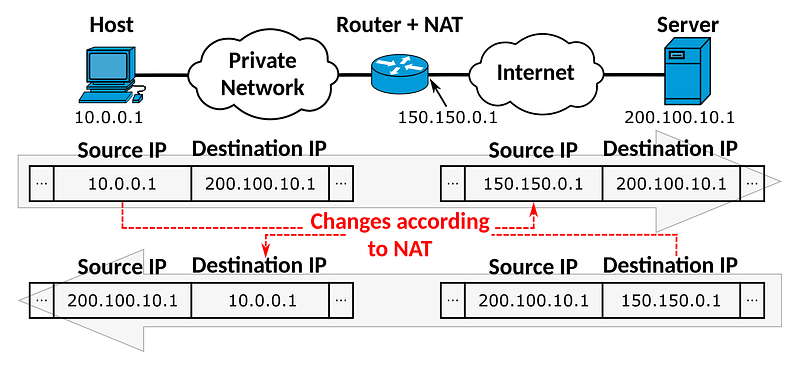 from wikipedia
All IP packets must have source address/port and destination address/port. When a device behind the home/private network, say my laptop, wants to access a webpage, it sends a message to the server. The message’s header looks like
source: 192.168.1.23 port 45
destination: 12.34.56.78 port 80
where 192.168.1.23 is the internal address within the home network of the laptop and 12.34.56.78 is the IP address of the webpage to view. The home router receives this message and makes two changes to the header
- source IP address to read as the external IP address of the home network
- source port to be an arbitrary port that is free
After the change, the new header looks something like
source: 123.4.67.89 port 1468
destination: 12.34.56.78 port 80
where 123.4.67.89 is the external IP address of the home network. Then the router transmits this message to the internet.
So, what is the reasoning here? First, the source IP address is translated to the external IP address so that the web server can respond back to the router — this is quite intuitive. The internal IP addresses are private to the home network and are not visible to the outside, so it is only natural to hide it before dispatching to the outside. What about the port?
Well, port assignment is so that the router can keep track of which device within the network should receive the response from the outside world should there be one. The router keeps a simple look up table as the outbound port number as the key and IP addresses/ports as the value, similar to below
lookup_table = {
  ...
  1468: "expected sender 12.34.56.78 port 80; to route to 192.168.1.23 port 45"
}
This is because multiple devices behind the network may want to communicate with the same webpage simultaneously, and the router needs to be able to uniquely identify which message goes to which device behind the home network — the messages have the same source address, so the only way to distinguish is by looking at the unique destination port number that the router assigns and keeps track of.
Let’s say the the server responds back and sends a message with the header
source: 12.34.56.78 port 80
destination: 123.4.67.89 port 1468
The router receives the message, looks up the port 1468, and matches the source address (i.e., the web server) with its record to verify whether the device (i.e., the laptop) is expecting this message. Only when the source address matches, the router relays the message to the internal network with yet another translation
source: 12.34.56.78 port 80
destination: 192.168.1.23 port 45
so that the laptop can receive the message.
This mechanism not only successfully relays messages from within the home network to the outside with encapsulation, but also protects the home network from security threats — the router blocks any message that has not be initiated/expected from the internal devices. This is also why you cannot setup a public server behind your home network, as the router will block any attempts to connect to your server — you need to explicitly setup port-forwarding.