Web fundamental series— 1
OK, so I have tried to avoid anything-web when it comes to programming. I was happy with system-level programming and command-line utilities. Unfortunately, this has narrowed my career significantly, as the vast majority of software jobs out there require or expect some experience with the web.
So, I have decided to write a series of articles on web fundamentals to teach myself and those alike. I want to emphasize on the basics of the web technology, rather than going over different web frameworks. Today, let’s start with HTTP.
https://kelvin.ink/resources/res/HttpIntroduction/http_client_server.png
HTTP is communication standard (protocol) between a server and a client. Unlike in system-level programming where there is only one entity (i..e, the system), the web world always consists of the client and the server. The client is typically the web browser and the server is, well, the web server. Every time one enters a URL address into the browser, the browser sends a request, and the server responds.
There are two things worth mentioning
- HTTP relies on TCP to transmit messages and data. TCP is a stream-oriented protocol. That means, there is no intrinsic boundary associated with messages. Hence, the server/client should provide boundary information within the message
- HTTP messages are stateless. That is, each message is independent of previous ones, though cookies and sessions can be added on top of HTTP to enable persistent data exchange
Let’s dissect a request message. A request consists of three parts:
- Request line is the first line of the request message. It consists of method, path, and version.
- headers: multiple lines consisting of key-value pairs separated by
:. The headers provide additional information, such as boundary information of the proceeding data (related to #1 above) - body: this contains optional content for some methods (such as POST)
Overall, the diagram below depicts the format.
https://image3.slideserve.com/5985213/http-request-message-general-format-l.jpg
Let’s take a look at how an actual request message looks like with curl.
$ curl -vG http://www.google.com/
*   Trying 2607:f8b0:4006:81c::2004:80...
* Connected to www.google.com (2607:f8b0:4006:81c::2004) port 80 (#0)
> GET / HTTP/1.1
> Host: www.google.com
> User-Agent: curl/7.81.0
> Accept: */*
>
...
The request message is indicated by > character, which consists of the request line GET / HTTP/1.1, headers, and empty body. Here, GET is the request method, / is the path, and HTTP/1.1 is the version.
Let’s look at another request
$ curl -v -XPUT -d'data from client' http://www.google.com/
*   Trying [2607:f8b0:4006:823::2004]:80...
* Connected to www.google.com (2607:f8b0:4006:823::2004) port 80 (#0)
> PUT / HTTP/1.1
> Host: www.google.com
> User-Agent: curl/7.88.1
> Accept: */*
> Content-Length: 16
> Content-Type: application/x-www-form-urlencoded
>
...
This time, the request is a PUT method. Note Content-Length: 16 in the headers section. This is corresponds to the string size of data from client that we are sending over. This will help the server correctly parse the data.
Now, let’s look at a response message. It also consists of three parts:
- status line is again the first line of the response. It contains version, status code, and reason phrase.
- headers in the same format as in the request.
- body is where the actual content is, such as an HTML page, image, video, etc.
https://image3.slideserve.com/5985213/http-response-message-n.jpg
Again, we can use curl to view the response message:
$ curl -vG google.com/
*   Trying 2607:f8b0:4006:81d::200e:80...
* Connected to google.com (2607:f8b0:4006:81d::200e) port 80 (#0)
> GET / HTTP/1.1
> Host: google.com
> User-Agent: curl/7.81.0
> Accept: */*
>

* Mark bundle as not supporting multiuse
< HTTP/1.1 301 Moved Permanently
< Location: http://www.google.com/
< Content-Type: text/html; charset=UTF-8
< Content-Security-Policy-Report-Only: object-src 'none';base-uri 'self';script-src 'nonce-gp6JuU7RyD2p7CvS7L3ETA' 'strict-dynamic' 'report-sample' 'unsafe-eval' 'unsafe-inline' https: http:;report-uri https://csp.withgoogle.com/csp/gws/other-hp
< Date: Wed, 19 Jul 2023 14:26:43 GMT
< Expires: Fri, 18 Aug 2023 14:26:43 GMT
< Cache-Control: public, max-age=2592000
< Server: gws
< Content-Length: 219
< X-XSS-Protection: 0
< X-Frame-Options: SAMEORIGIN
<
<HTML><HEAD><meta http-equiv="content-type" content="text/html;charset=utf-8">
<TITLE>301 Moved</TITLE></HEAD><BODY>
<H1>301 Moved</H1>
The document has moved
<A HREF="http://www.google.com/">here</A>.
</BODY></HTML>
* Connection #0 to host google.com left intact
Again lines starting with < char indicates the response message. Essentially, Google server returns a message asking to retry at http://www.google.com/ instead.
Now that we learned the basics of HTTP, let’s create a very simple server from scratch without any third-party libraries or framework. The server will do two things
- For
GETrequest, return string “hello world” - For
PUTrequest, echo whatever data it receives - For anything else, return
404 NOT FOUNDstatus
Here is Rust code for this simple server. By the way, if you are not too familiar with Rust itself, I highly recommend a similar tutorial here.
use std::io::{Read, Write};
use std::net::{TcpListener, TcpStream};

const OK: &str = "HTTP/1.1 200 OK\r\n\r\n";
const NOT_FOUND: &str = "HTTP/1.1 404 NOT FOUND\r\n\r\n";

fn handle_client(mut stream: TcpStream) -> std::io::Result<()> {
    let packet = read_packet(&mut stream)?;

    let request = String::from_utf8_lossy(&packet);
    let mut lines = request.lines();
    let method = lines.next().unwrap_or("");
    let response = match method {
        m if m.starts_with("GET /") => handle_get(lines),
        m if m.starts_with("PUT /") => handle_put(lines),
        _ => NOT_FOUND.to_owned(),
    };

    stream.write_all(response.as_bytes())?;
    stream.flush()?;
    Ok(())
}

fn read_packet(stream: &mut TcpStream) -> std::io::Result<Vec<u8>> {
    const BUFFER_SIZE: usize = 256;
    let mut buffer = [0; BUFFER_SIZE];
    let mut packet = Vec::new();
    loop {
        if let Ok(n) = stream.read(&mut buffer) {
            packet.extend_from_slice(&buffer[..n]);
            if n < BUFFER_SIZE {
                break;
            }
        }
    }
    Ok(packet)
}

fn handle_get<'a>(lines: impl Iterator<Item = &'a str>) -> String {
    format!("{OK}Hello world!\n")
}

fn handle_put<'a>(lines: impl Iterator<Item = &'a str>) -> String {
    let body = lines.last().unwrap_or("");
    format!("{OK}{body}")
}

fn main() -> std::io::Result<()> {
    let listener = TcpListener::bind("127.0.0.1:8080")?;
    println!("Listening on port 8080");

    for stream in listener.incoming() {
        let stream = stream?;
        handle_client(stream)?;
    }
    Ok(())
}
Notice that due to TCP’s stream-oriented nature, we need to manually handle reading the packet and cannot rely on read_to_end() or read_to_string() methods. Now, let’s run the server and test our web server
$ cargo run # run the server

# open up a new terminal window and run the following
$ curl -v -XGET localhost:8080
Note: Unnecessary use of -X or --request, GET is already inferred.
*   Trying 127.0.0.1:8080...
* Connected to localhost (127.0.0.1) port 8080 (#0)
> GET / HTTP/1.1
> Host: localhost:8080
> User-Agent: curl/7.88.1
> Accept: */*
>

< HTTP/1.1 200 OK
* no chunk, no close, no size. Assume close to signal end
<
Hello world!
* Closing connection 0

$ curl -v -XPUT -d"hello from client" localhost:8080
*   Trying 127.0.0.1:8080...
* Connected to localhost (127.0.0.1) port 8080 (#0)
> PUT / HTTP/1.1
> Host: localhost:8080
> User-Agent: curl/7.88.1
> Accept: */*
> Content-Length: 17
> Content-Type: application/x-www-form-urlencoded
>

< HTTP/1.1 200 OK
* no chunk, no close, no size. Assume close to signal end
<
* Closing connection 0
hello from client # no line feed

$ curl -v -XPOST localhost:8080
*   Trying 127.0.0.1:8080...
* Connected to localhost (127.0.0.1) port 8080 (#0)
> POST / HTTP/1.1
> Host: localhost:8080
> User-Agent: curl/7.88.1
> Accept: */*
>

< HTTP/1.1 404 NOT FOUND
* no chunk, no close, no size. Assume close to signal end
<
* Closing connection 0
Looks all good! Finally, let’s test it on a web browser by entering localhost:8080 into the address, which is essentially a GET request:
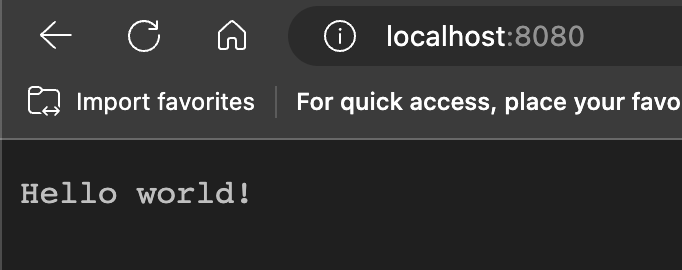
Hooray! The server works fine, but it is far from production-ready. For example, we probably should specify Content-Length value into the headers with the response to PUT to help the client parse the data. Also, we may want to scale up our server with multithreading techniques. All of these improvement we can think of is why there exist countless web server frameworks out there. However, they hide details of the web technology and makes it difficult to understand. Thus for our series, we will try our best to stay away from those!