Web fundamental series — 3
Last time, we looked at how GET request with query string looks like. Today, let’s use POST method to submit the form. Note that HTML form supports only GET and POST methods. Advantages of using POST rather than GET are
- POST can send any type of data, including binary data, while GET can only send ASCII characters.
- POST has no restriction on the length or size of the data, while GET has a length limitation on the URL.
- POST hides the data in the body of the request, while GET exposes the data in the URL.
- POST is more suitable for operations that cause side effects, such as creating or updating data, while GET should only be used for requesting data.
As before, we could let the server listen and echo the request message from the client to understand how the request data looks like. An easier way is to use the browser’s built-in developer tools.
First, let’s make a change to our HTML code to send POST method from the form element.
--- before
+++ after
@@ -11,7 +11,7 @@
 <head></head>
 <body>
     <div>
-        <form action="/" method="get">
+        <form action="/" method="post">
             <table>
                 <tr>
                     <td>
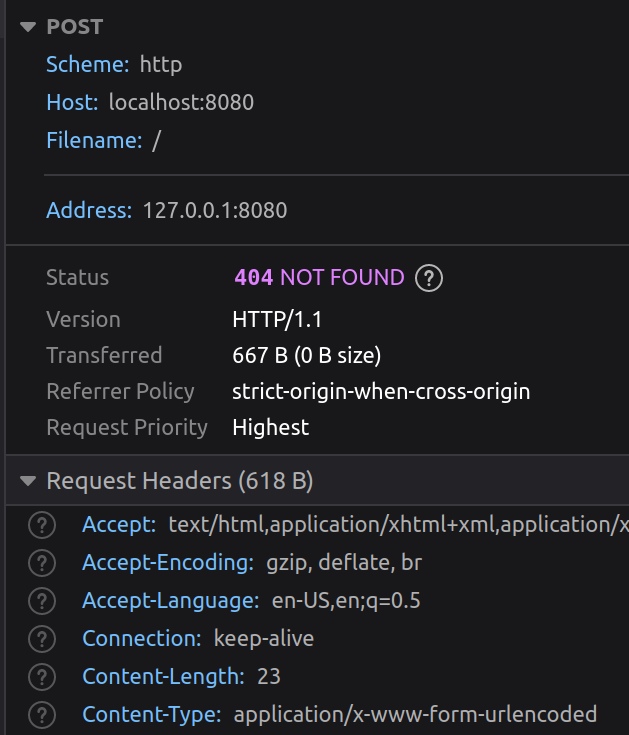
Launch the server, open up developer tools in the browser, and enter the URL localhost:8080. Enter in the text areas and submit. Now, inspect the network tab, and you will find HTTP request/response similar to below
](/images/medium/35d171bf436a_1-IOzstaqt8Rilh9Bu_lpLsw.png)
Worth noting are
- it is POST request, as expected
- path or filename is simply /, which effectively hides the data from the URL
- request headers contain Content-Type and Content-Length.
The Conetent-Type and Content-Length values help the server parse the data we are sending. Specifically, ContentType indicates how it is encoded and Content-Length tells us how long the data is. Again, given that HTTP is stream-oriented channel, the message needs to contain this piece of info. We can use serde_urlencoded crate as before to decode application/x-www-form-urlencoded data.
use serde_urlencoded;
use std::collections::HashMap;
use std::io::{Read, Write};
use std::net::{TcpListener, TcpStream};

const OK: &str = "HTTP/1.1 200 OK\r\n\r\n";
const NOT_FOUND: &str = "HTTP/1.1 404 NOT FOUND\r\n\r\n";
const HTML: &str = r#"
<!DOCTYPE html>
<html lang="en">
<head></head>
<body>
    <div>
        <form action="/" method="post">
            <table>
                <tr>
                    <td>
                        <label for="string1">String1</label>
                    </td>
                    <td>
                        <label for="string2">String2</label>
                    </td>
                </tr>
                <tr>
                    <td>
                        <textarea id="string1" name="string1"></textarea>
                    </td>
                    <td>
                        <textarea id="string2" name="string2"></textarea>
                    </td>
                </tr>
            </table>
            <div>
                <button type="submit">Submit</button>
            </div>
        </form>
    </div>
</body>
</html>"#;

fn handle_client(mut stream: TcpStream) -> std::io::Result<()> {
    let packet = read_packet(&mut stream)?;
    let request = String::from_utf8_lossy(&packet);
    let response = match request {
        ref m if m.starts_with("GET / ") => format!("{OK}{HTML}"),
        ref m if m.starts_with("POST / ") => {
            // find where data starts
            if let Some((_, data)) = request.split_once("\r\n\r\n") {
                let pairs: Vec<(String, String)> = serde_urlencoded::from_str(data).unwrap();
                pairs
                    .into_iter()
                    .map(|(k, v)| format!("{k}: {v}"))
                    .collect::<Vec<_>>()
                    .join("\n")
            } else {
                format!("{OK}invalid request format")
            }
        }
        _ => NOT_FOUND.to_owned(),
    };

    stream.write_all(response.as_bytes())?;
    stream.flush()?;
    Ok(())
}

fn read_packet(stream: &mut TcpStream) -> std::io::Result<Vec<u8>> {
    const BUFFER_SIZE: usize = 8 << 10; // 8k
    let mut buffer = [0; BUFFER_SIZE];
    let mut packet = Vec::new();
    loop {
        if let Ok(n) = stream.read(&mut buffer) {
            packet.extend_from_slice(&buffer[..n]);
            if n < BUFFER_SIZE {
                break;
            }
        }
    }
    Ok(packet)
}

fn main() -> std::io::Result<()> {
    let listener = TcpListener::bind("127.0.0.1:8080")?;
    println!("Listening on port 8080");

    for stream in listener.incoming() {
        let stream = stream?;
        handle_client(stream)?;
    }
    Ok(())
}
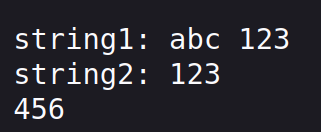
With this, the server can successfully parse the POST data and echo them to the browser
](/images/medium/719e15c6b147_1-zj4l3AHiUSlDVAHdEZGCsQ.png)
Note that string2 I entered was “123\n456”.
By the way, I am not making the use of Content-Length during my data parsing for simplicity, but this is not a good practice. As before, our code serves the purpose of demonstration only and not intended for production, as we are omitting error checks and corner case handling. For production server, one should use third-party web framework libraries rather than building one from scratch.