Async in Rust — 1
Concurrency means that multiple tasks are run with overlapping execution window. As discussed in my previous article, simultaneity is not necessity for concurrency.
The most intuitive way to achieve concurrency is via OS threads — spawn a separate thread for each task and delegate to the OS to handle concurrency. This works well when the number concurrent tasks is relatively small. Unfortunately, not so suitable for web servers where there could be thousands of concurrent connections to handle, in which most of the work is IO-bound.
Threads are orthogonal to asynchronous programming
So, how would we go about implementing an efficient web server that can handle a large number of concurrent connections? The answer is to implement much-like a thread, but smaller unit of work that is more scalable. This implies that we need to write our own scheduler that can handle switching back and forth between concurrent units of work, possibly within a single-thread.
Obviously, this is not an easy task, and that’s why we have third-party libraries that achieve just that, one of which is Tokio crate for Rust. The user only needs to write code with async and await to indicate when a particular unit of work can be suspended, and the implementation is handled by the library.
Let’s look at concrete examples. First, let’s say we need to download two files. A synchronous non-concurrent way of doing this is to download one by one in a blocking manner. This will complete in 2 seconds.
use std::thread;
use std::time::Duration;

fn download(url: &str) {
    thread::sleep(Duration::from_secs(1));
    println!("download complete from {}", url);
}

fn main() {
    download("https://www.foo.com");
    download("https://www.bar.com");
}
Next, we employ OS threads to run it concurrently, wherein a new thread is created for each download task. This will complete in 1 second. Note that this is not necessarily due to parallelization — even if we only have a single core, the code should still complete in 1 second.
use std::thread;
use std::time::Duration;

fn download(url: &str) {
    thread::sleep(Duration::from_secs(1));
    println!("download complete from {}", url);
}

fn main() {
    // Spawn two threads to do work.
    let thread_one = thread::spawn(|| download("https://www.foo.com"));
    let thread_two = thread::spawn(|| download("https://www.bar.com"));

    // Wait for both threads to complete.
    thread_one.join().unwrap();
    thread_two.join().unwrap();
}
Finally, we make use of tokio crate. Add to Cargo.toml
[dependencies]
tokio = { version = "1", features = ["full"] }
For emulating IO-bound tasks, we need to use async version of sleep() function provided in the tokio library.
use std::time::Duration;
use tokio;

async fn download_async(url: &str) {
    tokio::time::sleep(Duration::from_secs(1)).await;
    println!("download complete from {}", url);
}

#[tokio::main(flavor = "current_thread")]
async fn main() {
    tokio::join!(
        download_async("https://www.foo.com"),
        download_async("https://www.bar.com")
    );
}
Here, tokio::join!() macro ensures that the tasks are executed in the current thread, so we are not spawning a new thread. This also completes in 1 second.
The same can also be achieved slightly differently, using tokio::spawn() function. Note that #[tokio::main(flavor = “current_thread”)] macro specifies that all the tasks are executed in the current thread.
use std::time::Duration;
use tokio;

async fn download_async(url: &str) {
    tokio::time::sleep(Duration::from_secs(1)).await;
    println!("download complete from {}", url);
}

#[tokio::main(flavor = "current_thread")]
async fn main() {
    let h1 = tokio::spawn(download_async("https://www.foo.com"));
    let h2 = tokio::spawn(download_async("https://bar.foo.com"));

    h1.await.unwrap();
    h2.await.unwrap();
}
Tokio is more efficient for a large number of concurrent IO-bound tasks than multithreading approach
Let’s quantitatively analyze how much more efficient tokio is compared to naive multithread version. For that, we will slightly change our programs to accept the number of concurrent tasks as an argument.
First, the multithread implementation:
use std::thread;
use std::time::Duration;

fn download(url: impl ToString) {
    thread::sleep(Duration::from_secs(1));
    println!("download complete from {}", url.to_string());
}

fn main() {
    let n = std::env::args()
        .skip(1)
        .next()
        .map(|arg| arg.parse::<i32>().unwrap())
        .unwrap_or(100);
    let handles: Vec<_> = (0..n)
        .map(|idx| thread::spawn(move || download(idx)))
        .collect();
    for h in handles {
        h.join().unwrap();
    }
}
Next, one using tokio running on a single thread:
use std::time::Duration;
use tokio;

async fn download_async(url: impl ToString) {
    tokio::time::sleep(Duration::from_secs(1)).await;
    println!("download complete from {}", url.to_string());
}

#[tokio::main(flavor = "current_thread")]
async fn main() {
    let n = std::env::args()
        .skip(1)
        .next()
        .map(|arg| arg.parse::<i32>().unwrap())
        .unwrap_or(100);
    let handles: Vec<_> = (0..n)
        .map(|idx| tokio::spawn(download_async(idx)))
        .collect();

    for h in handles {
        h.await.unwrap();
    }
}
Let’s run 10k and 100k concurrent tasks on a single-core to be fair
$ for bin in thread tokio; do time taskset -c 0 target/release/$bin 10000 > /dev/null; done
$ for bin in thread tokio; do time taskset -c 0 target/release/$bin 100000 > /dev/null; done
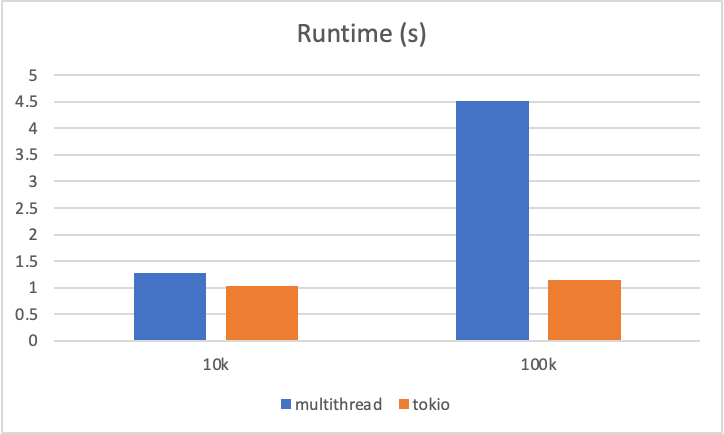
As the number of concurrent tasks grows, we can clearly see that the tokio version outperforms the multithread version. This does not mean we should never use multithreading; rather, it tells us that an OS thread is not suitable unit of work when it comes to lightweight but a large number of IO-bound tasks.
In fact when I increased the # concurrent tasks even further, the multithread version of the program failed to execute
$ taskset -c 0 target/release/thread 1000000 > /dev/null
thread 'main' panicked at 'failed to spawn thread: Os { code: 11, kind: WouldBlock, message: "Resource temporarily unavailable" }', /rustc/8ede3aae28fe6e4d52b38157d7bfe0d3bceef225/library/std/src/thread/mod.rs:686:29
note: run with `RUST_BACKTRACE=1` environment variable to display a backtrace
while tokio version ran just fine.
Hopefully, this has demonstrated the reasoning behind using tokio. Check out these excellent document as well.
Getting Started — Asynchronous Programming in Rust (rust-lang.github.io)