Rust — what #[inline] can do for your program
Me being myself, I have been working on writing pure Rust implementation of gunzip program. One of my goals is to get its speed comparable…
At one point, I ran a benchmark of my program decompressing Linux source code, which took about 6.2 seconds. For reference, the stock zlib library does it in just 2.6 seconds.

You can imagine my frustration. I already spent quite some effort to get to this point — I have used Flamegraph to iteratively find bottleneck functions and optimize. Finally, I got to the point where I can’t seem to do any more. And yet, my implementation was 2.4X slower than zlib.
I then tried our good old friend perf.
$ perf record ./a.out && perf report
According to perf report, there were several critical instructions with high overhead near call . Given that perf can only provide approximate location of the overhead, I figured it must be function calls within the critical section of the code.
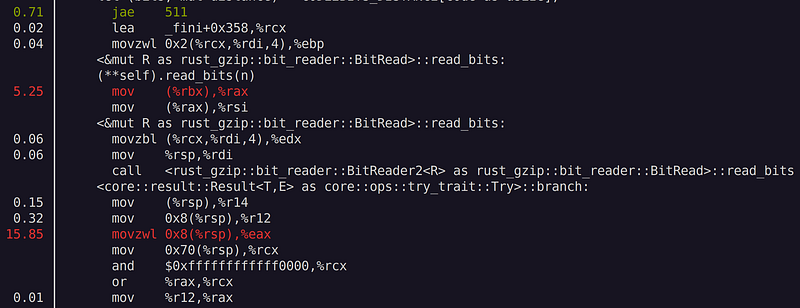
I then played around with #[inline] and #[inline(always)] attributes on functions that are called repetitively millions of times. I re-ran the benchmark, and to my surprise the runtime reduced by whopping 2.6X! The speed gain is literally too good to be true — but it is true!

After inline, perf report shows those functions are now inlined — I no longer see call instructions at places where there should be if not inlined.
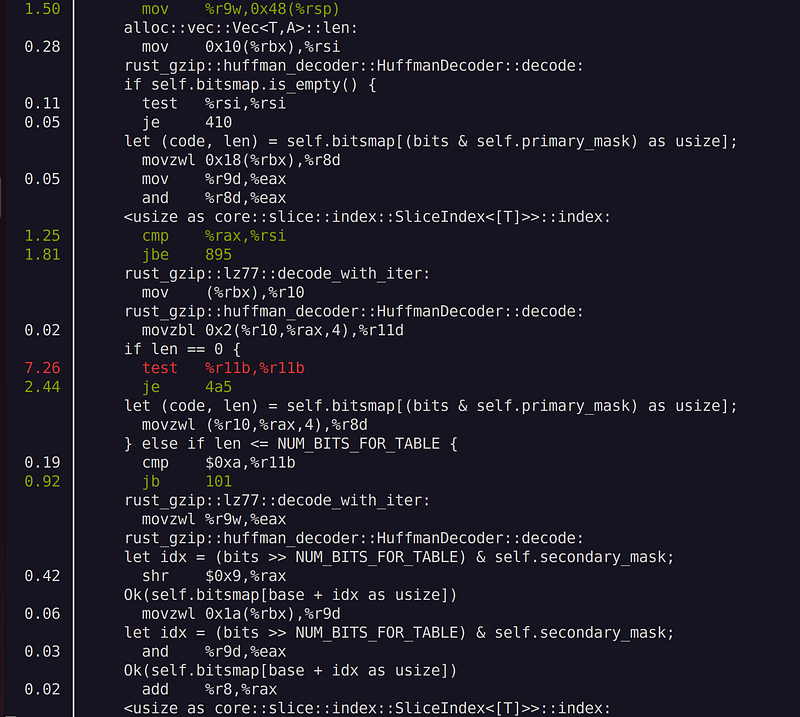
So, with just 4 lines of #[inline] attributes, I obtained 2.6 times performance improvement. To be fair, this is probably a dramatic scenario, and one typically won’t see this much difference on most programs, but still this shows how much impact #[inline] can have in a program that has a lot of function call overhead.
Looking at other crates focusing on performance, I can easily see the same #[inline] attributes in many functions. However, don’t spam it everywhere — inline is a double-edged sword.
Inline may help:
- can reduce the function call overhead, which is the time and memory needed to set up the arguments, jump to the function, and return from it
- can improve the performance of the code by allowing the compiler to optimize the function body in the context of the caller
- can increase the locality of reference, which is the tendency of a program to access data that is close in memory or time. This can improve the usage of the instruction cache, which is a small and fast memory that stores frequently executed instructions
Inline may backfire:
- can increase the code size, which can make the program larger and slower to load. This can also cause more cache misses, which are situations where the instruction cache does not contain the requested instruction and has to fetch it from a slower memory
- can make debugging harder, because it can obscure the original source code and make it difficult to set breakpoints or trace stack frames
- can reduce modularity and reusability, because it can prevent dynamic linking and loading of libraries that contain inlined functions
So, the best practice is to use inline only for those functions that are small and are called repetitively in the critical section. If you are stuck with optimizing your code, try #[inline] and see if that helps!