Rust — write gunzip from scratch 8
In this series, we will be writing gunzip decompressor from scratch in Rust. We want to write it ourselves not only to learn Rust but also to understand how it .gz compression works under the hood. For full source code, check out this Github repo. You can find all articles of the series below
- part 1:
main()function and skeletal structure - part 2:
bitreadmodule for reading bits from a byte stream - part 3:
gzipheader & footer for parsing the metadata and checksum - part 4:
inflatefor block type 0 (uncompressed) data - part 5:
codebookandhuffman_decodermodules for decoding Huffman codes - part 6:
lz77andsliding_windowmodules for decompressing LZ77-encoded data - part 7:
inflatefor block type 1 and 2 (compressed) data using fixed or dynamic Huffman codes - part 8:
checksum_writemodule for verifying the decompressed data - part 9: performance optimization
- part 10: multithread support
- part 11: streaming support
- part 12: memory optimization
- part 13: bug fix to reject non-compliant
.gzfile
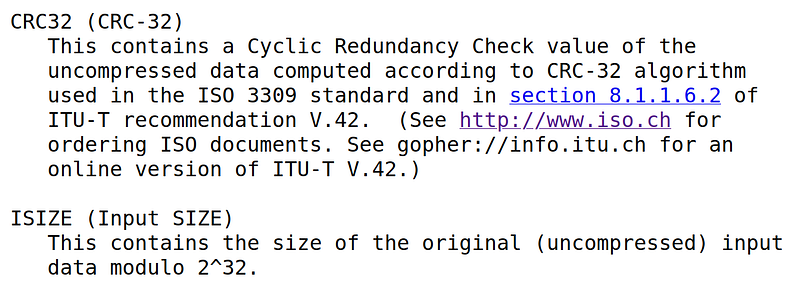
We are mostly complete, except some additional logic after reading the Footer. As specified in RFC1952, the Footer's CRC32 checksum and size must be validated with the decompressed data.
RFC1952
One way is to go back to Inflate and modify the write logic to compute checksum. Another way is to wrap Write trait to update checksum for write() method calls. We will choose the latter option. Let’s first define the API that we need
// checksum_write.rs
use std::io::Write;

pub trait ChecksumWrite: Write {
    /// resets the checksum upon this call
    fn checksum(&mut self) -> u32;

    /// Total # bytes wrote so far
    fn len(&self) -> usize;

    /// Reset length to be 0
    fn reset_len(&mut self);
}

impl<W: ChecksumWrite> ChecksumWrite for &mut W {
    fn checksum(&mut self) -> u32 {
        (**self).checksum()
    }

    fn len(&self) -> usize {
        (**self).len()
    }

    fn reset_len(&mut self) {
        (**self).reset_len()
    }
}

// append to src/lib.rs
pub mod checksum_write;
The ChecksumWrite trait inherits Write, meaning that it can act just like Write trait. Also, we will implement ChecksumWrite for any &mut ChecksumWrite, similar to what we did with BitRead. ChecksumWrite adds three additional methods to Write.
The first method checksum() will return the checksum value and re-initialize the checksum. We leave it general enough so that we can use it for different checksum algorithms. For example, in gzip, CRC32 is used, but in zlib, Adler32 is used. The second method len() simply returns the total number of bytes we have written so far, and the third method reset_len() resets the length to 0.
Let’s write a struct that implements ChecksumWrite trait. We will be making use of crc32fast crate. We could implement it ourselves but it may not be as optimized as using an external crate. In fact, this is the only external library that we will use for our gunzip program.
Let’s then write Crc32Writer struct that implements ChecksumWrite trait
// append to Cargo.toml
[dependencies]
crc32fast = "1.3"

// append to lib/checksum_write.rs
use crc32fast::Hasher;

pub struct Crc32Writer<W: Write> {
    hasher: Hasher,
    writer: W,
    n: usize,
}

impl<W: Write> Crc32Writer<W> {
    pub fn new(writer: W) -> Self {
        Self {
            hasher: Hasher::new(),
            writer,
            n: 0,
        }
    }
}

impl<W: Write> ChecksumWrite for Crc32Writer<W> {
    fn checksum(&mut self) -> u32 {
        let hasher = std::mem::replace(&mut self.hasher, Hasher::new());
        hasher.finalize()
    }

    fn len(&self) -> usize {
        self.n
    }

    fn reset_len(&mut self) {
        self.n = 0;
    }
}

impl<W: Write> Write for Crc32Writer<W> {
    fn write(&mut self, buf: &[u8]) -> std::io::Result<usize> {
        let n = self.writer.write(buf)?;
        self.hasher.update(&buf[..n]);
        self.n += n;
        Ok(n)
    }

    fn flush(&mut self) -> std::io::Result<()> {
        self.writer.flush()
    }
}
The implementation is straightforward. We just need to keep track of n for how many bytes we have written so far and delegate CRC32 calculation to crc32fast::Hasher.
Now, let’s make use of Crc32Writer in gunzip() function
// append to src/lib.rs
use checksum_write::{ChecksumWrite, Crc32Writer};

// modify in src/lib.rs
pub fn gunzip(read: impl Read, write: impl Write) -> Result<()> {
    let mut reader = BitReader::new(read);
    let mut writer = Crc32Writer::new(write);
    let mut member_idx = 0;

    while reader.has_data_left()? {
        Header::read(&mut reader)?;
        member_idx += 1;

        // read one or more blocks
        Inflate::new(&mut reader, &mut writer).run()?;

        let footer = Footer::read(&mut reader)?;
        let checksum = writer.checksum();
        let size = writer.len();

        if footer.crc32 != checksum {
            return Err(Error::ChecksumMismatch);
        }

        if footer.size as usize != size & 0xFFFFFFFF {
            return Err(Error::SizeMismatch);
        }

        writer.reset_len();
    }

    if member_idx == 0 {
        Err(Error::EmptyInput)
    } else {
        Ok(())
    }
}

// replace in src/error.rs
pub enum Error {
    StdIoError(ErrorKind),
    EmptyInput,
    InvalidGzHeader,
    InvalidBlockType,
    BlockType0LenMismatch,
    InvalidCodeLengths,
    HuffmanDecoderCodeNotFound,
    DistanceTooMuch,
    EndOfBlockNotFound,
    ReadDynamicCodebook,
    ChecksumMismatch,
    SizeMismatch
}
Finally, we are done with our program. Let’s compile and test it! I will test on two files: Linux source code (1.4GB) and Ubuntu image file (4.7GB). These files are pretty large, so it will take some time to download and compress/decompress. You are free to choose whichever file you want to test. Here is how I tested the program.
$ cargo build -r

# download linux source code as linux.tar file
$ wget https://cdn.kernel.org/pub/linux/kernel/v6.x/linux-6.5.5.tar.xz -O - | xz -d > linux.tar

# download ubuntu image as ubuntu.iso file
$ wget https://releases.ubuntu.com/22.04.3/ubuntu-22.04.3-desktop-amd64.iso -O ubuntu.iso

# verify by compressing (stock gzip) and decompressing (our gunzip) and compare to the original file
# will take quite some time; on my pc with Ryzen 7735HS, it took ~2m 30s
$ for file in linux.tar ubuntu.iso; do cmp $file <(gzip <$file | target/release/gunzip); done
If you don’t see any error from cmp, then we know our gunzip is restoring the original file! We can also throw different implementations of gzip compression, i.e., pigz and bgzip that compress using multithreads.
# install bgzip
$ sudo apt install -y tabix

# install pigz
$ sudo apt install -y pigz

# compress with bgzip using 8 threads
$ for file in linux.tar ubuntu.iso; do cmp $file <(bgzip -@8 <$file | target/release/gunzip); done

# compress with pigz using 8 threads
$ for file in linux.tar ubuntu.iso; do cmp $file <(pigz -p8 <$file | target/release/gunzip); done
Alright! Our gunzip program seems to work quite well. This is truly amazing achievement and we should be proud to have done it finally! In the next article, we will benchmark and optimize our implementation so stay tuned!
Previous in series: https://techhara.me/posts/2023-10-10_rust—write-gunzip-from-scratch-7-15747e6032e4/
Next in series: https://techhara.me/posts/2023-10-14_rust—write-gunzip-from-scratch-9-66cbda36cc0c/