Rust — write gunzip from scratch 9
In this series, we will be writing gunzip decompressor from scratch in Rust. We want to write it ourselves not only to learn Rust but also to understand how it .gz compression works under the hood. For full source code, check out this Github repo. You can find all articles of the series below
- part 1:
main()function and skeletal structure - part 2:
bitreadmodule for reading bits from a byte stream - part 3:
gzipheader & footer for parsing the metadata and checksum - part 4:
inflatefor block type 0 (uncompressed) data - part 5:
codebookandhuffman_decodermodules for decoding Huffman codes - part 6:
lz77andsliding_windowmodules for decompressing LZ77-encoded data - part 7:
inflatefor block type 1 and 2 (compressed) data using fixed or dynamic Huffman codes - part 8:
checksum_writemodule for verifying the decompressed data - part 9: performance optimization
- part 10: multithread support
- part 11: streaming support
- part 12: memory optimization
- part 13: bug fix to reject non-compliant
.gzfile
Let’s benchmark and measure how fast/efficient our implementation is. First, we want to measure how long it takes to decompress Linux source code linux.tar file and Ubuntu image ubuntu.iso file.
$ gzip linux.tar ubuntu.iso
$ /usr/bin/time -v target/release/gunzip < linux.tar.gz > linux.tar
Command being timed: "target/release/gunzip"
User time (seconds): 3.07
System time (seconds): 0.51
Percent of CPU this job got: 99%
Elapsed (wall clock) time (h:mm:ss or m:ss): 0:03.58
Average shared text size (kbytes): 0
Average unshared data size (kbytes): 0
Average stack size (kbytes): 0
Average total size (kbytes): 0
Maximum resident set size (kbytes): 2048
.
.
.

$ /usr/bin/time -v target/release/gunzip < ubuntu.iso.gz > ubuntu.iso
Command being timed: "target/release/gunzip"
User time (seconds): 6.75
System time (seconds): 2.42
Percent of CPU this job got: 99%
Elapsed (wall clock) time (h:mm:ss or m:ss): 0:09.18
Average shared text size (kbytes): 0
Average unshared data size (kbytes): 0
Average stack size (kbytes): 0
Average total size (kbytes): 0
Maximum resident set size (kbytes): 2176
.
.
.
So it took about 3.6s and 9.2s to decompress linux.tar.gz and ubuntu.iso.gz, respectively. Let’s see how long it takes for stock gunzip by replacing target/release/gunzip with gunzip.
$ /usr/bin/time -v gunzip < linux.tar.gz > linux.tar
Command being timed: "gunzip"
User time (seconds): 4.12
System time (seconds): 0.54
Percent of CPU this job got: 99%
Elapsed (wall clock) time (h:mm:ss or m:ss): 0:04.67
Average shared text size (kbytes): 0
Average unshared data size (kbytes): 0
Average stack size (kbytes): 0
Average total size (kbytes): 0
Maximum resident set size (kbytes): 1792
.
.
.

$ /usr/bin/time -v gunzip < ubuntu.iso.gz > ubuntu.iso
Command being timed: "gunzip"
User time (seconds): 15.66
System time (seconds): 2.09
Percent of CPU this job got: 94%
Elapsed (wall clock) time (h:mm:ss or m:ss): 0:18.80
Average shared text size (kbytes): 0
Average unshared data size (kbytes): 0
Average stack size (kbytes): 0
Average total size (kbytes): 0
Maximum resident set size (kbytes): 1792
.
.
.
Wow, it took 4.7s and whopping 18.8s for the stock gunzip! Not sure why, the GNU gzip is not as fast compared to gzip shipped on BSD-variants, such as macOS. The stock gzip on macOS was way faster than GNU gzip, which is shipped on all Linux distros. Still, however, GNU gzip is efficient with memory with less resident set size (RSS) compared to our implementation.
Next, we want to optimize our program for even faster runtime. For profiling, we will use flamegraph and perf. Before we do that, we need to enable debugging symbols for our release executable. For that, append
[profile.release]
debug = true
into Cargo.toml file and re-build it.
$ cargo build -r
Let’s start off with flamegraph. If you don’t have flamegraph installed, you can easily do this with cargo
$ cargo install flamegraph
Let’s run the program and analyze with flamegraph
$ cargo flamegraph --open --bin gunzip < linux.tar.gz > linux.tar
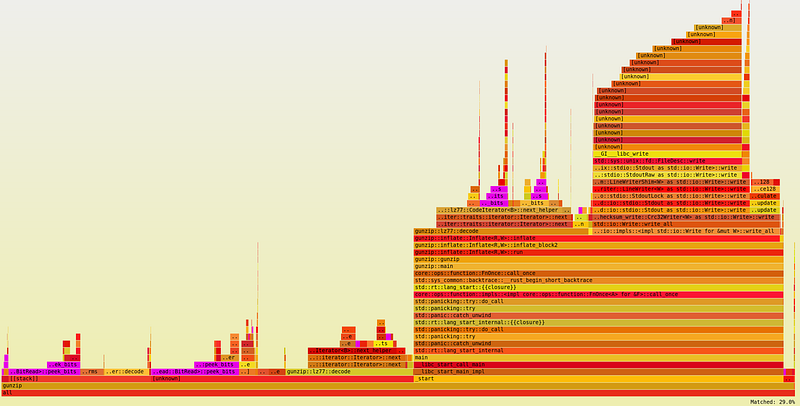
From the graph, we can immediately tell that peek_bits() method is a hot spot, comprising nearly 30% of the total runtime. Another hot spot is next_helper() method from CodeIterator, also comprising nearly 30%. Finally, HuffmanDecoder::decode() method comprises nearly 10%.
With this in mind, let’s run perf
$ perf record target/release/gunzip < linux.tar.gz > linux.tar && perf report
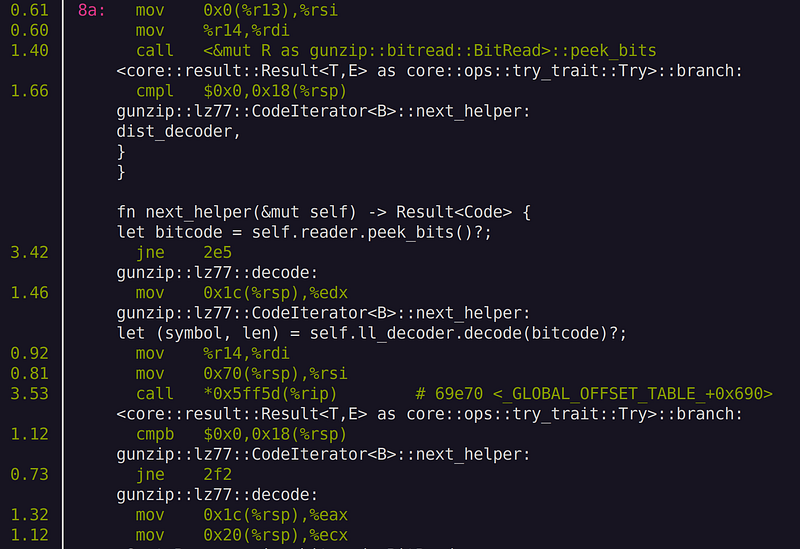
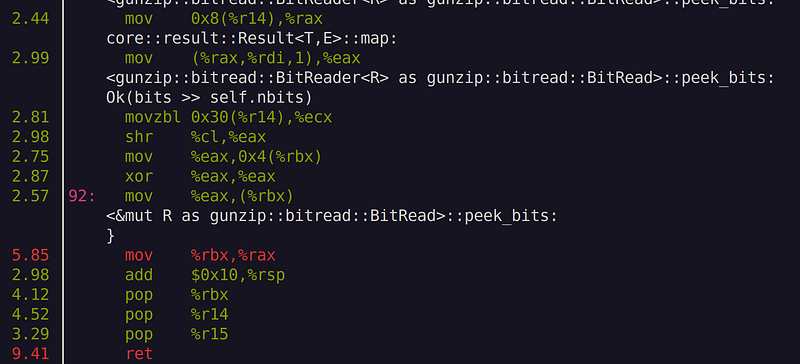
What we see is some overhead nearby call and ret instructions. These instructions indicate function calls. Unsurprisingly, we see function calls to peek_bits() and next_helper() and decode(). near the hot spot. Let’s remove those function calls by inlining those hot spot functions. All we do is prepend the inline attribute
#[inline(always)]
on top of BitReader::peek_bits(), CodeIterator::next_helper(), CodeIterator::next(), and HuffmanDecoder::decode().
Now, let’s re-build and run perf again
$ cargo build -r
$ perf record target/release/gunzip < linux.tar.gz > linux.tar && perf report
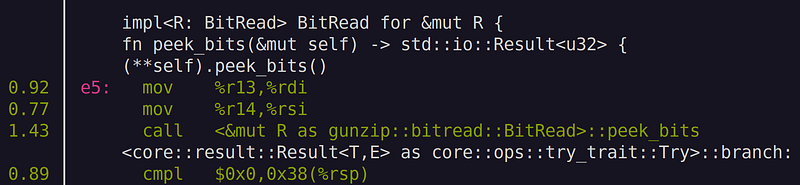
We still see call instruction for peek_bits(). Note that we are seeing (**self).peek_bits()! This means that we need to add inline attribute for peek_bits() in &mut BitRead. While at it, let’s also throw inline attribute to read_bits() method as well as consume() method, since they are called quite often too.
// add to BitRead trait in src/bitread.rs
    #[inline(always)]
    fn read_bits(&mut self, n: u32) -> std::io::Result<u32> {
        debug_assert!(n <= 24);
        let bits = self.peek_bits()?;
        self.consume(n);
        Ok(bits & ((1 << n) - 1))
    }

// add to BitRead for &mut BitRead in src/bitread.rs
    #[inline(always)]
    fn peek_bits(&mut self) -> std::io::Result<u32> {
        (**self).peek_bits()
    }

    #[inline(always)]
    fn consume(&mut self, n: u32) {
        (**self).consume(n)
    }
Let’s re-compile and run the same test again
$ cargo build -r
$ /usr/bin/time -v target/release/gunzip < linux.tar.gz > linux.tar
Command being timed: "target/release/gunzip"
User time (seconds): 1.99
System time (seconds): 0.57
Percent of CPU this job got: 100%
Elapsed (wall clock) time (h:mm:ss or m:ss): 0:02.57
Average shared text size (kbytes): 0
Average unshared data size (kbytes): 0
Average stack size (kbytes): 0
Average total size (kbytes): 0
Maximum resident set size (kbytes): 2176
.
.
.

$ /usr/bin/time -v target/release/gunzip < ubuntu.iso.gz > ubuntu.iso
Command being timed: "target/release/gunzip"
User time (seconds): 5.52
System time (seconds): 2.45
Percent of CPU this job got: 99%
Elapsed (wall clock) time (h:mm:ss or m:ss): 0:07.98
Average shared text size (kbytes): 0
Average unshared data size (kbytes): 0
Average stack size (kbytes): 0
Average total size (kbytes): 0
Maximum resident set size (kbytes): 2176
.
.
.
Hooray! we made quite significant improvement in the runtime, from 3.6s to 2.6s, about 40% improvement in speed just by adding inline attributes! If you run perf again, you will see that those hot spot functions are completely inlined.
Unfortunately, for ubuntu.iso.gz decompression we only saw slight reduction in runtime, from 9.2s to 8.0s, which is about 15%. This is probably because ubuntu.iso.gz file—being a binary file that is hard to compress—consists of many uncompressed blocks, i.e., block type0, which is not affected by our optimization.
Now our code runs pretty fast. We didn’t even try that hard to optimize for performance, not even a single unsafe block within our code. Our implementation is mostly vanilla, straight from RFC1951. This is one of the best selling points of Rust language—it achieves C/C++ level performance with completely safe code. In the next article, we will further improve our program by adding a multithread support, so stay tuned!
Previous in series: https://techhara.me/posts/2023-10-12_rust—write-gunzip-from-scratch-8-fa51fa98aa60/
Next in series: https://techhara.me/posts/2023-10-16_rust—write-gunzip-from-scratch-10-f368d5511349/