Rust — write gunzip from scratch 12
In this series, we will be writing gunzip decompressor from scratch in Rust. We want to write it ourselves not only to learn Rust but also to understand how it .gz compression works under the hood. For full source code, check out this Github repo. You can find all articles of the series below
- part 1:
main()function and skeletal structure - part 2:
bitreadmodule for reading bits from a byte stream - part 3:
gzipheader & footer for parsing the metadata and checksum - part 4:
inflatefor block type 0 (uncompressed) data - part 5:
codebookandhuffman_decodermodules for decoding Huffman codes - part 6:
lz77andsliding_windowmodules for decompressing LZ77-encoded data - part 7:
inflatefor block type 1 and 2 (compressed) data using fixed or dynamic Huffman codes - part 8:
checksum_writemodule for verifying the decompressed data - part 9: performance optimization
- part 10: multithread support
- part 11: streaming support
- part 12: memory optimization
- part 13: bug fix to reject non-compliant
.gzfile
I thought I was done with the series as of part 11, but I figured I could continue to improve it. I won’t go into every detail anymore; instead, I will go over some of the major update/improvement to the program. Today, we will optimize our implementation to reduce its memory footprint.
Profile memory usage
First, let’s measure how much memory the program consumes. A simple proxy is to use GNU time command to output maximum resident set size (RSS)
# time is bash built-in command, so we have to invoke GNU time by its full path
$ /usr/bin/time -v target/release/gunzip < linux.tar.gz > linux.tar
Command being timed: "target/release/gunzip"
User time (seconds): 2.11
System time (seconds): 0.40
Percent of CPU this job got: 99%
Elapsed (wall clock) time (h:mm:ss or m:ss): 0:02.52
Average shared text size (kbytes): 0
Average unshared data size (kbytes): 0
Average stack size (kbytes): 0
Average total size (kbytes): 0
Maximum resident set size (kbytes): 10072
...
Our program is consuming about 10MB, which seems OK at first. Let’s compare with a reference, say GNU Gzip
$ /usr/bin/time -v gunzip < /mnt/ramdisk/linux.tar.gz > /mnt/ramdisk/linux.tar
Command being timed: "gunzip"
User time (seconds): 4.61
System time (seconds): 0.26
Percent of CPU this job got: 99%
Elapsed (wall clock) time (h:mm:ss or m:ss): 0:04.88
Average shared text size (kbytes): 0
Average unshared data size (kbytes): 0
Average stack size (kbytes): 0
Average total size (kbytes): 0
Maximum resident set size (kbytes): 1816
...
Though GNU Gzip is much slower than ours, its memory footprint is 5x less than ours at 1.8MB. If GNU Gzip can do this with less than 2MB, we’d better do something to reduce our program’s memory footprint to a comparable size.
Locate the issue
Now, we need to figure out why the program is consuming so much memory. The best tool for this is valgrind. Let’s install the packages we will need today
$ sudo apt install -y valgrind massif-visualizer
We will use massif to record time evolution of memory footprint as the program is executing. Then we will use massif-visualizer to locate which part of the program is consuming the most memory
# run valgrind to generate massif data file
$ valgrind --tool=massif target/release/gunzip < linux.tar.gz > linux.tar
==20788== Massif, a heap profiler
==20788== Copyright (C) 2003-2017, and GNU GPL'd, by Nicholas Nethercote
==20788== Using Valgrind-3.18.1 and LibVEX; rerun with -h for copyright info
==20788== Command: target/release/gunzip
==20788==

==20788==


# run massif-visualizer to easily navigate the data
$ massif-visualizer massif.out.20788
 massif-visualizer
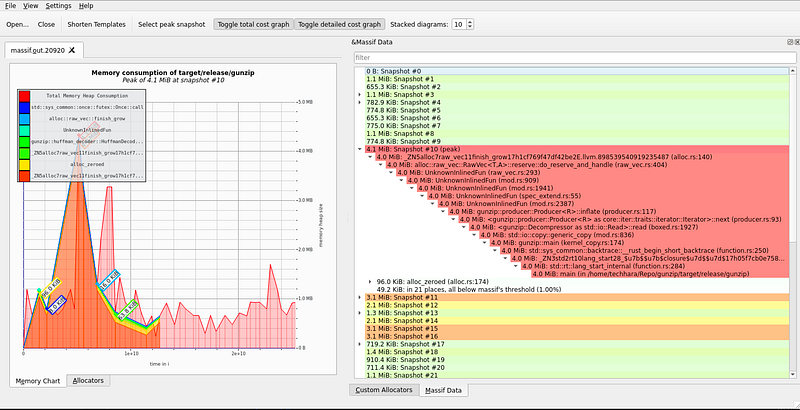
On the left, we have time-evolution of memory heap consumption, where the x-axis is time in unit of # instructions and y-axis is memory heap size. On the right, we see each snapshot at different time instances. Expanding the snapshot at the peak, we see 4MB of memory from producer.rs at line 117.
 peak memory culprit
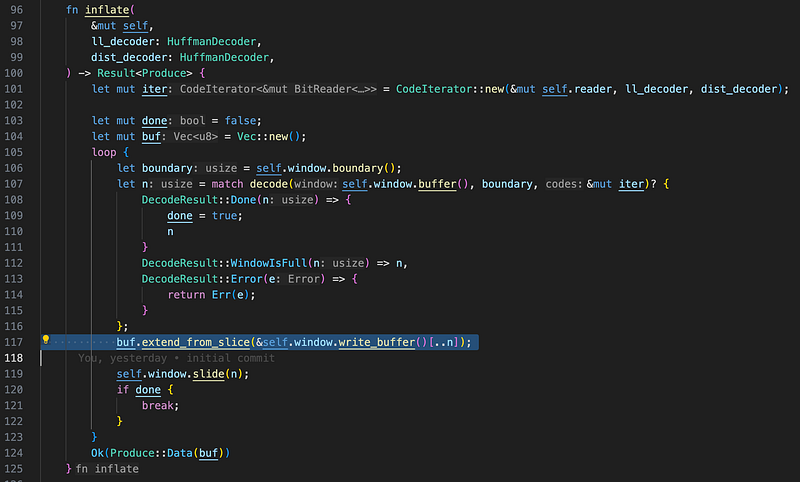
Exactly at line 117, we indeed see buf variable, which is accumulating data until the inflate block is complete. Deflate specification does not limit how large a compressed block (type 1 or type 2) can be, so this buf variable can grow as large as the entire uncompressed file size—you can imagine a file that consists of only a single compressed block.
Fix the issue
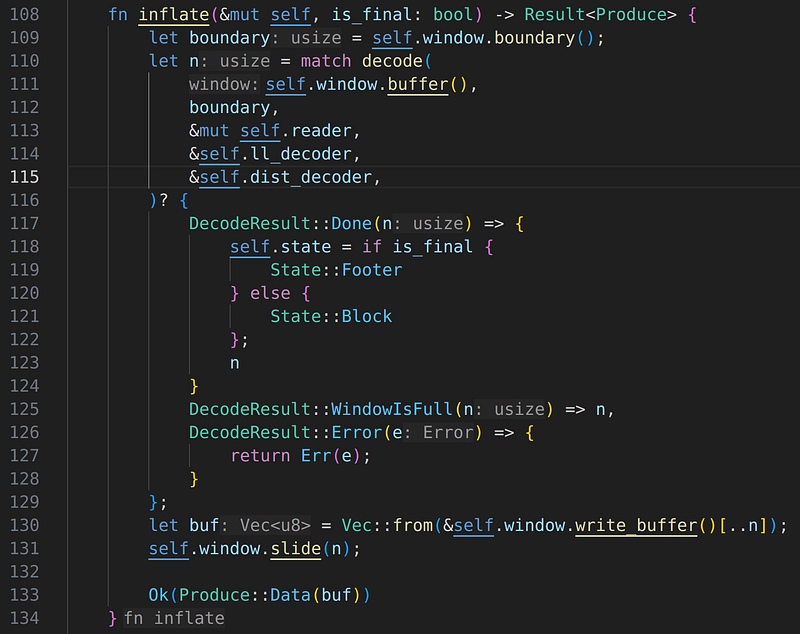
Now that we know precisely where the problem is, it is time to fix the issue. An obvious fix is to return partial block data each time the window is full, rather than accumulating. The fix, along with other minor code changes, can be found here. I won’t go into the code changes in detail here, as that is not the main focus of this article, but feel free to check out the patch. Below shows the inflate() method after the fix; we no longer accumulate the data.
inflate() method after the fix
Evaluate the fix
Let’s re-compile and run the same valgrind-massif evaluation. Below shows the new report after the fix has been applied
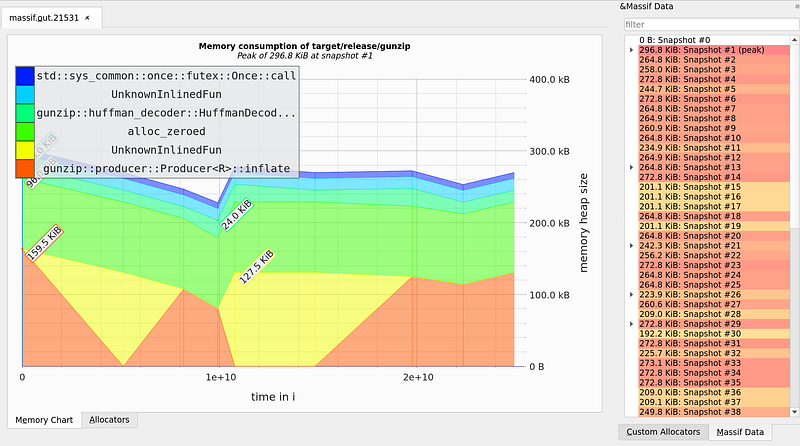 massif-visualizer after the fix
Hooray! The total heap memory consumption is consistently staying below 300kB for the entire run. This is a massive difference compared to the previous report. Now, let’s measure maximum RSS
$ /usr/bin/time -v target/release/gunzip < linux.tar.gz > linux.tar
Command being timed: "target/release/gunzip"
User time (seconds): 2.17
System time (seconds): 0.35
Percent of CPU this job got: 100%
Elapsed (wall clock) time (h:mm:ss or m:ss): 0:02.52
Average shared text size (kbytes): 0
Average unshared data size (kbytes): 0
Average stack size (kbytes): 0
Average total size (kbytes): 0
Maximum resident set size (kbytes): 2616
...
It has reduced to 2.6MB, again a massive reduction in memory footprint without any impact on the runtime. Now, I guess we can officially claim that our gunzip program is not only performant (runtime) but also memory-efficient!
Previous in series: https://techhara.me/posts/2023-10-18_rust—write-gunzip-from-scratch-11-1b4e7cbcc0ef/
Next in series: https://techhara.me/posts/2024-04-16_rust—write-gunzip-from-scratch-part-13-57509b73ad1a/