Implement streaming web server from scratch
These days, chatbots based on LLMs are widely used. The outputs from the chatbots are emitted token by token, which is typically displayed in a streaming fashion to users. Today, let’s implement a server that displays a streaming text html page from scratch without relying on third-party library or framework in Python.
Server-Sent Events
Server-sent events (SSE) protocol is probably the easiest and most straightforward way to implement a server that displays a streaming text page. Here are some reference pages if you are interested in technical details
- https://developer.mozilla.org/en-US/docs/Web/API/Server-sent_events/Using_server-sent_events
- https://developer.mozilla.org/en-US/docs/Web/API/Server-sent_events
- https://html.spec.whatwg.org/multipage/server-sent-events.html#server-sent-events
Below shows server-client communications with SSE
- client sends a request to server
- server responds with 200, sending an HTML page with
EventSourceobject - client sends
text/event-streamrequest to the server - server responds with
text/event-streamheader with an empty body - server repeatedly sends streaming text data
- client receives and processes the data as it arrives
HTML page
Below shows minimal HTML page that contains EventSource object, indicating SSE. Every time the server sends event-stream data, the page will simply display the new text.
<!DOCTYPE html>
<html>
<head>
</head>
<body>
<div id="sseData"></div>
<script>
if(typeof(EventSource)!=="undefined") {
    var eSource = new EventSource("/");
    eSource.onmessage = function(event) {
        document.getElementById("sseData").innerHTML = event.data;
    };
}
else {
    document.getElementById("sseData").innerHTML="Your browser doesn't support SSE.";
}
</script>
</body>
</html>
Server side
The server needs to do the usual, i.e., creating a socket object and listening for a new request. For this example, we will create a simple function that completes a given text word by word to emulate chatbot output.
def streamer(text):
    tokens = text.split()
    for end in range(len(tokens) + 1):
        yield ' '.join(tokens[:end])
        time.sleep(0.1)
The logic would follow what I described in SSE section, but there is a catch.
When the streaming event finishes, the server can close the connection. However, the client may ask for additional
event-stremdata. If the server has no more data to update, it should return204 No Content.
Full code
Below is a bare minimal server code that implements a streaming text via SSE where we implement everything manually.
# server.py
import socket
import time


html = '''<!DOCTYPE html>
<html>
<head>
</head>
<body>
<div id="sseData"></div>
<script>
if(typeof(EventSource)!=="undefined") {
    var eSource = new EventSource("/");
    eSource.onmessage = function(event) {
        document.getElementById("sseData").innerHTML = event.data;
    };
}
else {
    document.getElementById("sseData").innerHTML="Your browser doesn't support SSE.";
}
</script>
</body>
</html>'''

text = '''Rust is a multi-paradigm, general-purpose programming language that emphasizes performance, type safety, and concurrency. It enforces memory safety, meaning that all references point to valid memory, without requiring the use of automated memory management techniques, such as garbage collection. To simultaneously enforce memory safety and prevent data races, its "borrow checker" tracks the object lifetime of all references in a program during compilation. Rust was influenced by ideas from functional programming, including immutability, higher-order functions, and algebraic data types. It is popular for systems programming.[13][14][15]

Software developer Graydon Hoare created Rust as a personal project while working at Mozilla Research in 2006. Mozilla officially sponsored the project in 2009. In the years following the first stable release in May 2015, Rust was adopted by companies including Amazon, Discord, Dropbox, Google (Alphabet), Meta, and Microsoft. In December 2022, it became the first language other than C and assembly to be supported in the development of the Linux kernel.

Rust has been noted for its rapid adoption,[16], and has been studied in programming language theory research.[17][18][19]'''


def streamer(text):
    tokens = text.split()
    for end in range(len(tokens) + 1):
        yield ' '.join(tokens[:end])
        time.sleep(0.1)


# Create a TCP socket
s = socket.socket(socket.AF_INET, socket.SOCK_STREAM)

# Bind the socket to a port
s.bind(('localhost', 8000))

# Listen for incoming connections
s.listen()

while True:
    try:
        # Accept a connection
        conn, addr = s.accept()
        request = conn.recv(1024).decode()
        print(f'------------------request----------------\n{request}')

        if 'Accept: text/event-stream' in request:
            # this is from previous connection
            response = 'HTTP/1.1 204 No Content\r\n\r\n'
            conn.sendall(response.encode())
            print(f'------------------response----------------\n{response}')
        else:
            # new connection
            response = f'HTTP/1.1 200 OK\r\nContent-Type: text/html\r\nContent-Length: {len(html)}\r\n\r\n{html}'
            conn.sendall(response.encode())
            print(f'------------------response----------------\n{response}')

            request = conn.recv(1024).decode()
            print(f'------------------request----------------\n{request}')
            if 'Accept: text/event-stream' not in request:
                # ignore any other request
                response = 'HTTP/1.1 204 No Content\r\n\r\n'
                conn.sendall(response.encode())
                print(
                    f'------------------response----------------\n{response}')
            else:
                # SSE; send head first
                response = 'HTTP/1.1 200 OK\r\nContent-Type: text/event-stream\r\nCache-Control: no-cache\r\n\r\n'
                conn.sendall(response.encode())
                print(
                    f'------------------response----------------\n{response}')

                # then send data
                for data in streamer(text):
                    response = f'data: {data}\n\n'
                    conn.sendall(response.encode())
                    print(
                        f'------------------response----------------\n{response}')

        conn.close()
    except Exception as e:
        print(e)
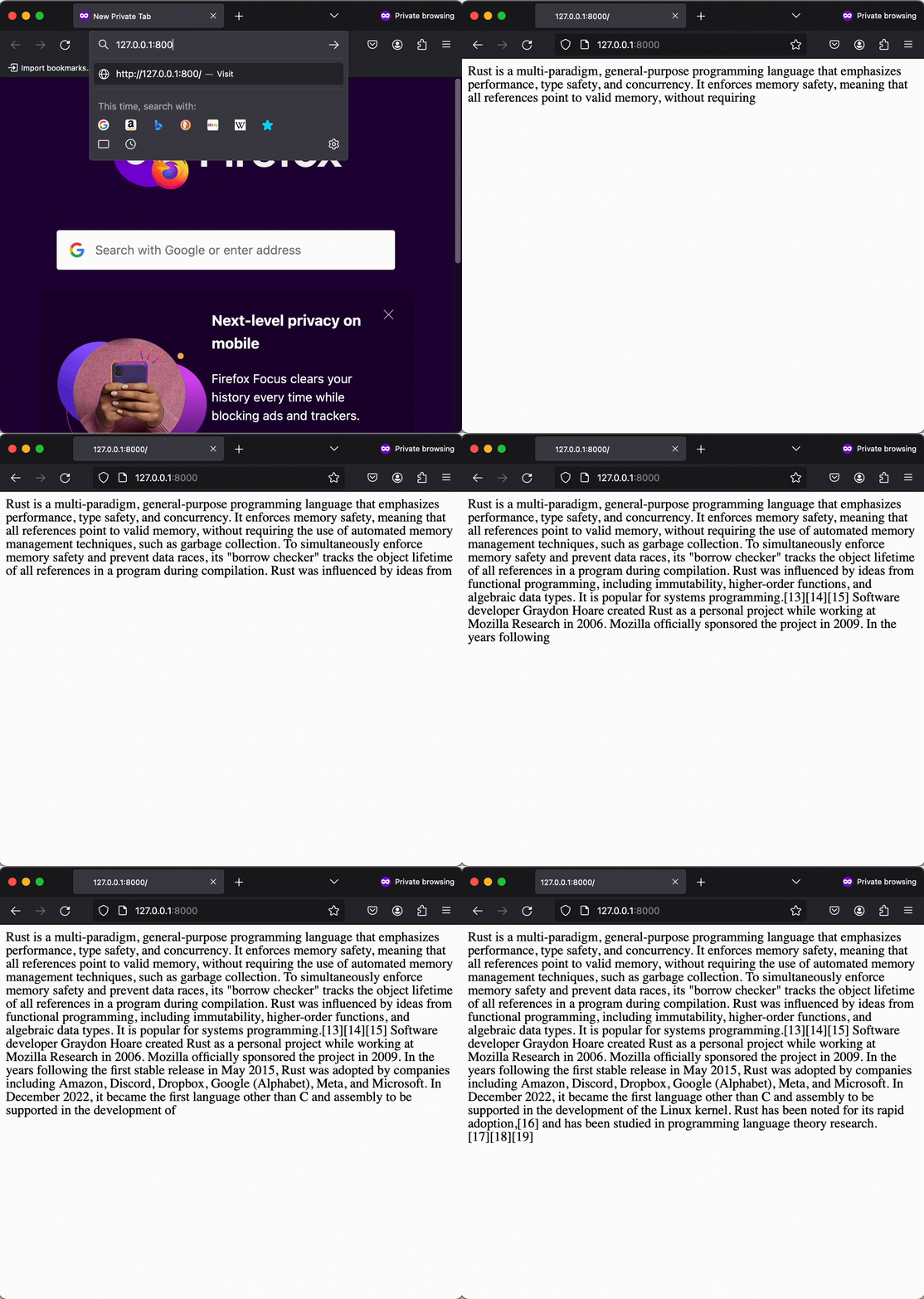
To run, we would simply execute
python server.py
and open up a browser for http://127.0.0.1:8000 page. You should see a streaming text!