Deploy your personal ChatGPT locally from scratch— part 3
In the previous stories [1] [2], we looked at the two essential components to build a chatbot, namely the LLM server and the web interface. In this story, we will integrate them together and finalize our quest to deploy a chatbot locally.
Sequence Diagram
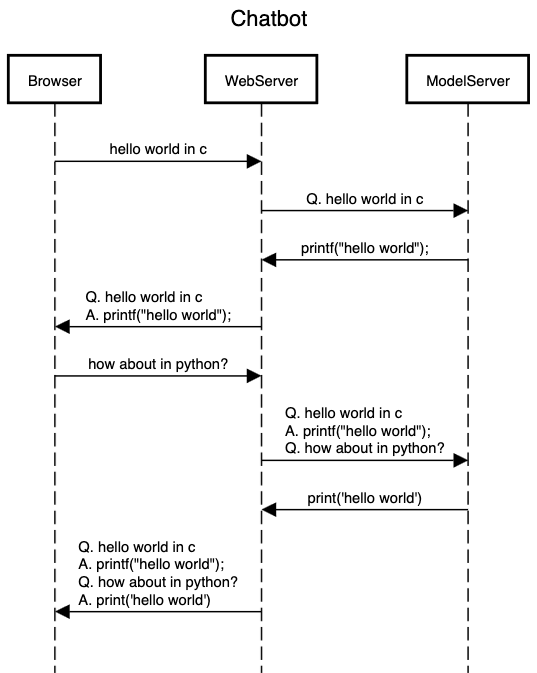
The diagram above depicts how the three players, e.g., the browser, model server, and the web server, communicate with each other.
- A user will interact through the browser, which will communicate only with the web server. The browser sends a request to the web server.
- The web server appends the full context (history) and sends a request to the model server.
- The model server convert to the appropriate prompt, generates the response, and send back to the web server (in a streaming fashion)
- The web server updates the context and relays the response back to the browser
- and repeats
We already have the communication layer between the browser and the web server. The missing piece is the communication layer between the web server and the model server.
Model server
Previously, we wrote code to run the model inference but did not add a communication layer. Now, we will add a server component to it— will respond to a POST request at /model for response generation. We will be using fastapi library to do this in just a few extra lines of code. Let’s start with a non-streaming version.
# model.py
from fastapi import FastAPI
from typing import Dict
from transformers import AutoTokenizer, AutoModelForCausalLM, TextIteratorStreamer


app = FastAPI()

model_path = 'TinyLlama/TinyLlama-1.1B-Chat-v1.0'

model = AutoModelForCausalLM.from_pretrained(model_path)
tokenizer = AutoTokenizer.from_pretrained(model_path)
streamer = TextIteratorStreamer(tokenizer)
model.eval()


@app.post("/model")
async def query(msg: Dict):
    print(msg)
    inputs = tokenizer(msg['prompt'], return_tensors="pt")
    generation_kwargs = dict(inputs, max_new_tokens=100)
    output = model.generate(**generation_kwargs)
    response = tokenizer.decode(output[0].tolist(), skip_special_tokens=True)
    return {'response': response}
To test the server, run the following commands
# install fastapi
pip install fastapi

# run the server
uvicorn model:app

# fire up another terminal window
# send a post request to the model server
curl -H "Content-Type: application/json" -d'{"prompt": "Q: implement quick sort in Rust\nA:"}' http://127.0.0.1:8000/model
If everything is successful, you should see the response in the form of json format.
Prompt formatting
As discussed in part 1, each model has been trained with a specific prompt format. Let’s write a function that returns a prompt for the model given the chat history. The chat history is a list of dictionary having two keys: role and content. This is what will the model server will receive from the web server. Below is a simple function that converts the chat history into a prompt for our model.
def generate_prompt(messages: List[Dict]) -> str:
    prompt = '<|system|>\nYou are a friendly chatbot who never refuses to answer anything</s>\n'
    for msg in messages:
        prompt += f'<|{msg["role"]}|>\n{msg["content"]}</s>\n'
    prompt += '<|assistant|>\n'
    return prompt
Streaming
As before, we need to support streaming mode. This can be easily done via fastapi.responses.StreamingResponse class. With all these changes, below is the final code for our model server
# model-stream.py
from fastapi import FastAPI
from fastapi.responses import StreamingResponse
from typing import Dict, List
from transformers import AutoTokenizer, AutoModelForCausalLM, TextIteratorStreamer
from threading import Thread


app = FastAPI()

model_path = 'TinyLlama/TinyLlama-1.1B-Chat-v1.0'

model = AutoModelForCausalLM.from_pretrained(model_path)
tokenizer = AutoTokenizer.from_pretrained(model_path)
streamer = TextIteratorStreamer(tokenizer, skip_prompt=True) # output only the response
model.eval()


async def stream_response(prompt: str):
    inputs = tokenizer(prompt, return_tensors="pt")
    generation_kwargs = dict(inputs, streamer=streamer)
    thread = Thread(target=model.generate, kwargs=generation_kwargs)
    thread.start()

    generated_text = ''
    for new_text in streamer:
        generated_text += new_text
        yield generated_text
    yield generated_text[:-4] # remove '</s>' at the end


def generate_prompt(messages: List[Dict]) -> str:
    prompt = '<|system|>\nYou are a friendly chatbot who never refuses to answer anything</s>\n'
    for msg in messages:
        prompt += f'<|{msg["role"]}|>\n{msg["content"]}</s>\n'
    prompt += '<|assistant|>\n'
    print(f'-------------PROMPT---------------\n{prompt}')
    return prompt


@app.post("/model")
async def query(messages: List[Dict]):
    print(f'-------------MSG---------------\n{messages}')
    return StreamingResponse(stream_response(generate_prompt(messages)), media_type='text/event-stream')
Let’s test it again
# run the server
uvicorn model-stream:app

# fire up another terminal window
# send a post request to the model server
curl -N -H "Content-Type: application/json" -d'[{"role": "user", "content": "write hello world in Rust"}]' http://127.0.0.1:8000/model
This should return the response in a streaming fashion.
Web server
Finally, let’s remove the dummy streamer() function and sends a request to the model server for the response. We can use requests.post() function for that. Make sure to set stream=True to enable streaming.
with requests.post("http://127.0.0.1:8000/model", stream=True, json=st.session_state.messages) as r:
    for chunk in r.iter_content(chunk_size=None):
        msg = chunk.decode()
        message_placeholder.markdown(msg)
Let’s put everything together. Below is the final web server code.
# web-app.py
import streamlit as st
import requests


st.title("💬 Chatbot")
st.caption("🚀 A streamlit chatbot powered by local LLM")
if "messages" not in st.session_state:
    st.session_state.messages = [
        {"role": "assistant", "content": "How can I help you?"}]

for msg in st.session_state.messages:
    st.chat_message(msg["role"]).write(msg["content"])

if prompt := st.chat_input(key='chat'):
    st.chat_input(key='quiet', disabled=True)
    st.session_state.messages.append({"role": "user", "content": prompt})
    with st.chat_message('user'):
        st.markdown(prompt)

    with st.chat_message('assistant'):
        message_placeholder = st.empty()
        with requests.post("http://127.0.0.1:8000/model", stream=True, json=st.session_state.messages) as r:
            for chunk in r.iter_content(chunk_size=None):
                msg = chunk.decode()
                message_placeholder.markdown(msg)

    st.session_state.messages.append({"role": "assistant", "content": msg})
    st.chat_input(disabled=False)
    st.rerun()
Note that I have made a minor change to disable the input chat window while the response is being generated. Other than that, everything should be identical.
Deploy
We are finally ready to test our local chatbot.
# run the model server
uvicorn model-stream:app

# on a new terminal, run the web server
streamlit run web-app.py
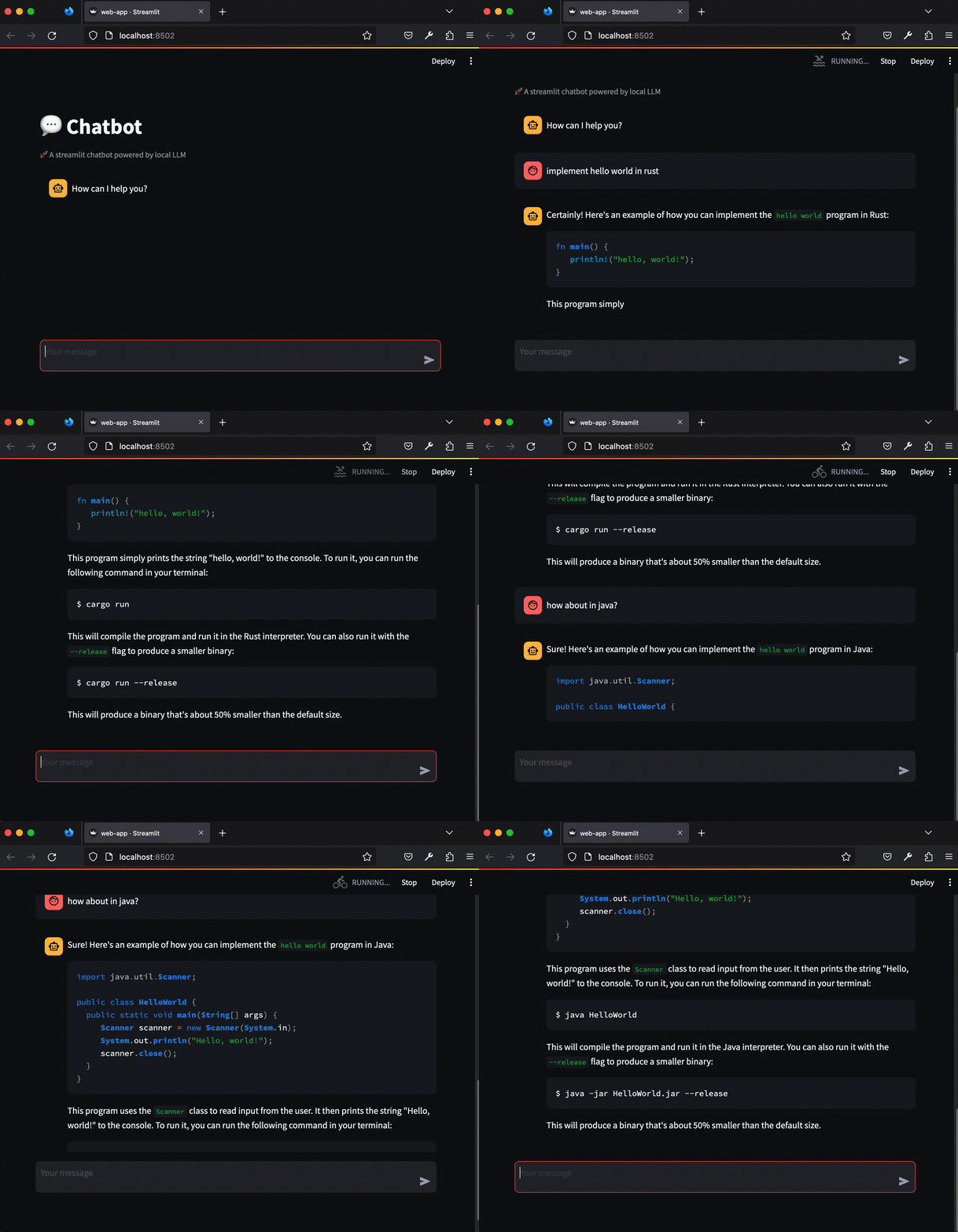
Check out the final source code here. Enjoy your personal assistant!