Brew no more
I have been using homebrew to install software on my trusty macOS. Now, I am trying to switch over to nix package manager instead. Today, let’s explore why I plan on this switch.
Nix package manager is rapidly gaining its popularity among developers recently. Its main advantages over traditional package manager such as homebrew are
- reproducible: Nix builds packages in isolation from each other. This ensures that they are reproducible and don’t have undeclared dependencies, so if a package works on one machine, it will also work on another.
- one that rules all: no need to use homebrew of macOS, apt for Ubuntu, yum for RedHat, and port for FreeBSD. Just learn Nix and use it everywhere.
Unfortunately, there is no free lunch. Nix has its own disadvantages
- learning curve: Nix has a steeper learning curve due to its unique approach to package management.
- community: Nix is not yet the most popular package manager out there. You won’t be able to find as much help with Nix compared to homebrew.
I myself is a newbie just getting started with Nix. Hence, this article’s main target audience is those who are interested in Nix and and are considering the switch, just like myself.
Getting started
First, let’s install nix package manager on macOS.
sh <(curl -L https://nixos.org/nix/install)
The installation script is well documented and should be self-explanatory.
First, let’s install one of my favorite macOS app — stats. Let’s search for the package at https://search.nixos.org/packages
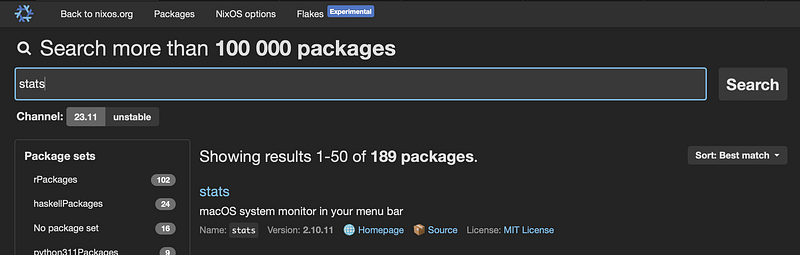
The first entry is what we are looking for. Click on the name and choose nix-env tab. Copy the command under Non NixOS:
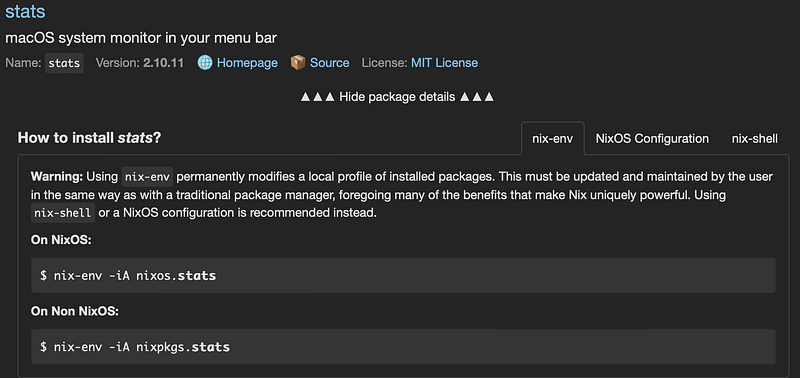
Alright. That’s the command we run on our terminal.
nix-env -iA nixpkgs.stats
installing 'stats-2.10.11'
this path will be fetched (3.53 MiB download, 12.09 MiB unpacked):
  /nix/store/2ssvsbjwg779i01s99mak7ndn4rrgzcq-stats-2.10.11
copying path '/nix/store/2ssvsbjwg779i01s99mak7ndn4rrgzcq-stats-2.10.11' from 'https://cache.nixos.org'...
building '/nix/store/ibayd07zhjm5qbwf1m48b6fgpzdx66cr-user-environment.drv'...
You can find the app on ~/.nix-profile/Applications/
# find where it is installed
$ ls ~/.nix-profile/Applications/
Stats.app

# run the app
$ open ~/.nix-profile/Applications/Stats.app
Next up, let’s install xz, the infamous compression utility. Again, we search for xz and copy the command to install
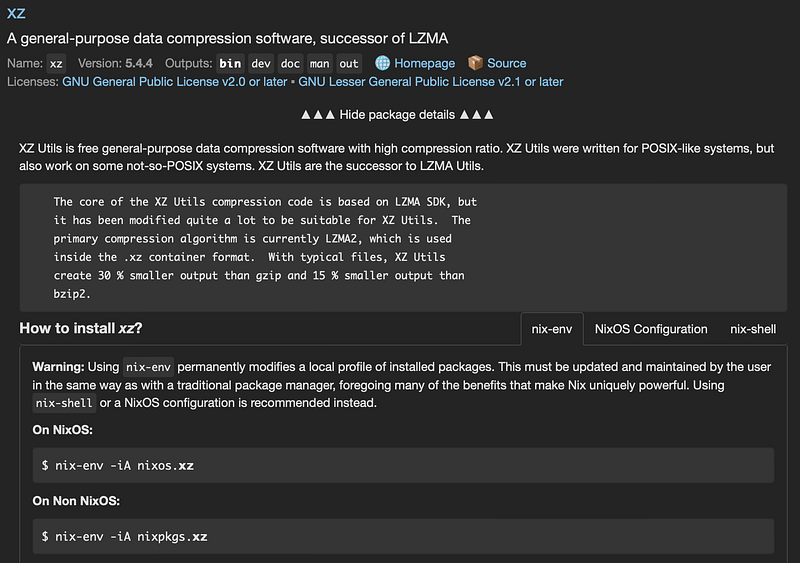
nix-env -iA nixpkgs.xz
installing 'xz-5.4.6'
these 5 paths will be fetched (0.32 MiB download, 1.83 MiB unpacked):
  /nix/store/m2xg3nyy2dbsc410xd0561j6mwc0i829-xz-5.4.6
  /nix/store/dwazqyxzc2a7ra10nr50mvg0qnd409yr-xz-5.4.6-bin
  /nix/store/jgn1rgg7i167sq1acimddajs3r4n034w-xz-5.4.6-dev
  /nix/store/ddl8hlwbcm0zpqjypmlwvckb99igncba-xz-5.4.6-doc
  /nix/store/7af6hc6zihr24yzc4nq08mr0xvjcilv4-xz-5.4.6-man
copying path '/nix/store/m2xg3nyy2dbsc410xd0561j6mwc0i829-xz-5.4.6' from 'https://cache.nixos.org'...
copying path '/nix/store/ddl8hlwbcm0zpqjypmlwvckb99igncba-xz-5.4.6-doc' from 'https://cache.nixos.org'...
copying path '/nix/store/7af6hc6zihr24yzc4nq08mr0xvjcilv4-xz-5.4.6-man' from 'https://cache.nixos.org'...
copying path '/nix/store/dwazqyxzc2a7ra10nr50mvg0qnd409yr-xz-5.4.6-bin' from 'https://cache.nixos.org'...
copying path '/nix/store/jgn1rgg7i167sq1acimddajs3r4n034w-xz-5.4.6-dev' from 'https://cache.nixos.org'...
building '/nix/store/bmp9gm9475ymv109a98ccxpnhzy0m1vl-user-environment.drv'...
This time, you should have this program ready to run
$ which xz
/Users/techhara/.nix-profile/bin/xz

$ xz --version
xz (XZ Utils) 5.4.6
liblzma 5.4.6
Alright. Hopefully this wasn’t too difficult of a transition from homebrew. Note that Nix official documentation does not recommend using nix-env
Warning: Using
nix-envpermanently modifies a local profile of installed packages. This must be updated and maintained by the user in the same way as with a traditional package manager, foregoing many of the benefits that make Nix uniquely powerful. Usingnix-shellor a NixOS configuration is recommended instead.
However, we are just getting started with Nix, so I think it is better to start with nix-env to unblock the transition first and then gradually explore more advanced features step by step later in the course.
If you’d like to further explore nix, below may be of an interest to you.