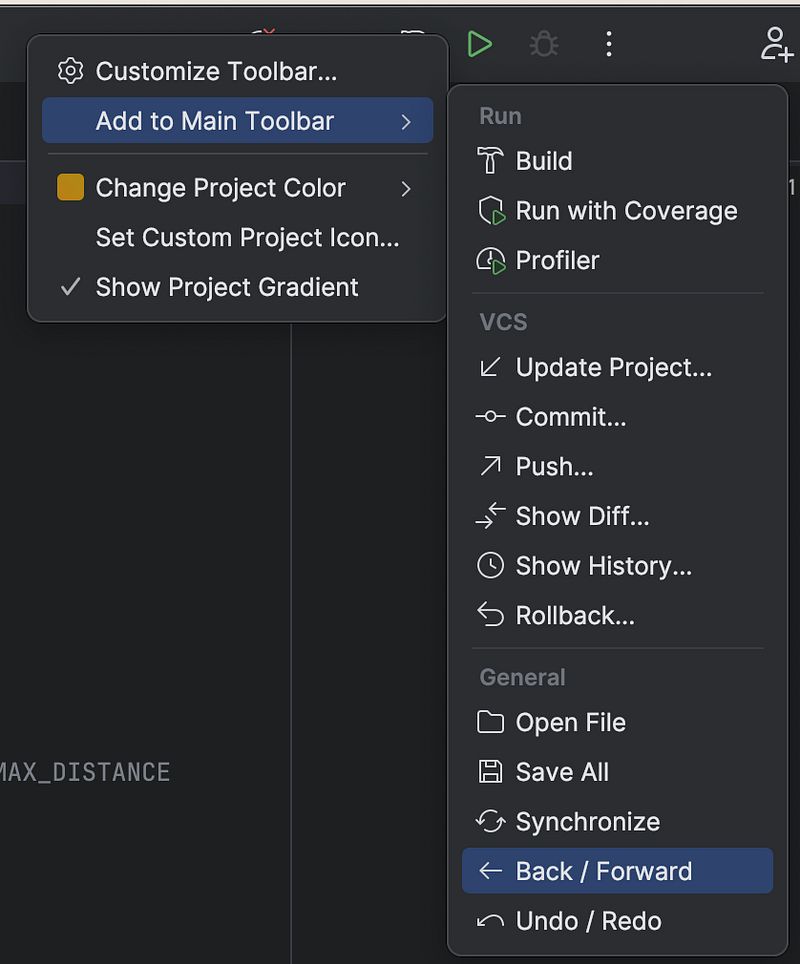
Restore forward/backward buttons on Jetbrains IDEs
I don’t know why, but Jetbrain’s new modern UI does not come with backward/forward buttons by default. Not only do I like the classic UI better (maybe because I am used to it) but also missing backward/forward buttons by default with the new UI is quite annoying to me personally. Why change the UI when there is no added benefit than just the look while losing loyal users who are used to the old UI?
OK, enough ranting. Today, I am writing this article for those who feel the same as myself and are looking for a way to add those two buttons back. It took me quite some time to figure this little thing out, which made me even more frustrating. So, here is how you’d add those buttons back. Just right-click on the top bar, and you will see the options under Add to Main Toolbar.