Rust — monitor stdio traffic
In the previous article, we saw how we can intercept the LSP traffic and log them. Today, we will do the same but a bit more elegantly. We will write this program together from scratch in Rust.
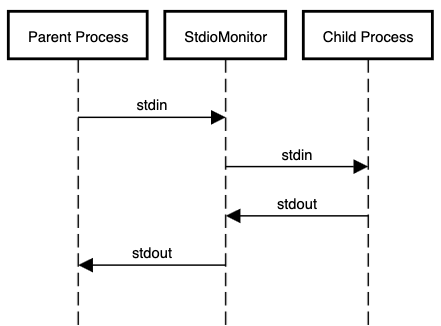
In the context of LSP, the parent process is the LSP client (such as VSCode) while the child process is the LSP server (such as rust-analyzer), but our program is not limited to just LSP; it can be used for any generic scenario where two processes communicate via stdio.
Implementation
The program expects the command to run the child process with optional parameters to specify where to log the traffic.
Usage: stdio-monitor [OPTIONS] -- <COMMAND>...

Arguments:
  <COMMAND>...  command to execute the program with arguments...

Options:
      --stdin <STDIN>    Path to log stdin traffic; default to stderr
      --stdout <STDOUT>  Path to log stdout traffic; default to stderr
      --stderr <STDERR>  Path to log stderr traffic; default to stderr
The easiest way to add command line options is to use clap crate. So, let’s create a blank project and then add clap crate
cargo new stdio-monitor
cd stdio-monitor
cargo add clap --features derive
Now, let’s add the command line arguments
// stdio-monitor/src/main.rs
use clap::Parser;

/// monitor stdin/stdout/stderr
#[derive(Parser, Debug)]
#[command(override_usage = "stdio-monitor [OPTIONS] -- <COMMAND>...")]
struct Args {
    /// Path to log stdin traffic; default to stderr
    #[arg(long)]
    stdin: Option<String>,

    /// Path to log stdout traffic; default to stderr
    #[arg(long)]
    stdout: Option<String>,

    /// Path to log stderr traffic; default to stderr
    #[arg(long)]
    stderr: Option<String>,

    /// command to execute the program with arguments...
    #[arg(required = true)]
    command: Vec<String>,
}

fn main() {
  let args = Args::parse();
}
Let’s run our program with --help option
cargo run -- --help
monitor stdin/stdout/stderr

Usage: stdio-monitor [OPTIONS] -- <COMMAND>...

Arguments:
  <COMMAND>...  command to execute the program with arguments...

Options:
      --stdin <STDIN>    Path to log stdin traffic; default to stderr
      --stdout <STDOUT>  Path to log stdout traffic; default to stderr
      --stderr <STDERR>  Path to log stderr traffic; default to stderr
  -h, --help             Print help
Perfect! Now let’s proceed. The next thing we want is to parse optional parameters and create a Write object. If none is provided, it will be a stderr by default. We want a function that takes in an optional string and returns a Write object.
fn parse_option(path: Option<String>) -> Result<Box<dyn Write>> {
    if path.is_none() {
        Ok(Box::new(stderr()))
    } else {
        let file = File::create(path.unwrap())?;
        Ok(Box::new(file))
    }
}
Note that we are returning a dynamic Write object because stderr and File are different implementations of Write.
Another helper function to implement is a function that takes a Read and two Write, duplicating everything from Read to both Write objects, similar to POSIX tee command
fn tee(mut read: impl Read, mut w1: impl Write, mut w2: impl Write) -> Result<usize> {
    const BUF_SIZE: usize = 1024;
    let mut total = 0;
    let mut buf = [0; BUF_SIZE];
    loop {
        let n = read.read(&mut buf)?;
        if n == 0 {
            break;
        }
        total += n;
        w1.write_all(&buf[..n])?;
        w1.flush()?;
        w2.write_all(&buf[..n])?;
        w2.flush()?;
    }

    Ok(total)
}
One thing to note is that we don’t want to buffer the output. To ensure we forward the data immediately, we call flush() method.
OK, we are now ready to continue with the main() function. First, we need to launch the child program from the provided command.
fn main() -> Result<()> {
    let args = Args::parse();
    eprintln!("Launching: {}", &args.command.join(" "));
    let mut program = Command::new(&args.command[0])
        .args(&args.command[1..])
        .stdin(Stdio::piped())
        .stdout(Stdio::piped())
        .stderr(Stdio::piped())
        .spawn()?;
We make sure to pipe stdin, stdout, and stderr. Now, let’s grab the child’s stdio processes.
    let child_stdin = child.stdin.take().expect("Failed to get child's stdin");
    let mut child_stderr = child.stderr.take().expect("Failed to get child's stderr");
    let child_stdout = child.stdout.take().expect("Failed to get child's stdout");
Next, we need to create threads for each of the task below
- read from
stdinand forward to the childstdinwhile logging - read from child
stdoutand forward tostdoutwhile logging - log child
stderr
    // read from stdin and forward to the child stdin while logging
    let _ = std::thread::spawn(move || {
        let stdin_logger = parse_option(args.stdin).expect("Failed to open stdin logger");
        tee(stdin(), stdin_logger, child_stdin).expect("Failed to tee stdin");
    });

    // read from child stdout and forward to stdout while logging
    let stdout_thread = std::thread::spawn(move || {
        let stdout_logger = parse_option(args.stdout).expect("Failed to open stdout logger");
        tee(child_stdout, stdout_logger, stdout()).expect("Failed to tee stdout");
    });

    // log child stderr
    let stderr_thread = std::thread::spawn(move || {
        let mut stderr_logger = parse_option(args.stderr).expect("Failed to open stderr logger");
        copy(&mut child_stderr, &mut stderr_logger).expect("Failed to forward stderr");
    });
For the first two tasks, we are calling tee() function above, while for the last task, we are employing std::io::copy() function.
Our program needs to exit when the child process exits. We also need to wait for the last two threads to exit gracefully.
    // Wait for the program and last two threads to finish
    let status = child.wait()?;
    stderr_thread.join().expect("Failed to join stderr thread");
    stdout_thread.join().expect("Failed to join stdout thread");
Why are we not joining the first thread? That’s because it will be most likely blocked at read() method. Hence, the easiest way is to simply force-exit our program, forwarding the child’s exit status.
    // stdin thread won't join, so need to exit explicitly
    if !status.success() {
        eprintln!("program exited with {:?}", status);
        exit(-1);
    } else {
        exit(0);
    }
}
Finally, don’t forget to append import statements.
use std::fs::File;
use std::io::Result;
use std::io::{copy, stderr, stdin, stdout, Read, Write};
use std::process::{exit, Command, Stdio};
That’s it! You can find the full project source code here.