Amazon Kindle Scribe vs Boox Go 10.3
Recently, I purchased Amazon Kindle Scribe and Boox Go 10.3 tablets to take notes and more importantly to read PDFs. If you are looking for a great note-taking e-reader, you are probably juggling between these two, so I wanted to share my thoughts on these two.
Why e-book reader?
Sadly, the truth is that I am aging, and my eyes are easily fatigued when I read from a display that is back-lit. This includes my 27-inch 4k monitor, my laptop, and my iPad. Inverting the typical white-background black-text into black-background white-text helps a bit, but I still miss reading from a printed paper. Practically speaking though, I can’t possibly print every single web page or papers into papers and read—that would be disastrous the environment.
So, e-ink is supposed to provide the closest experience to printed paper. Unlike LCD or OLED displays that are emissive (i.e., backlit), e-ink screen is reflective just like paper. I am not a medical expert but I feel that my eyes are much more comfortable when reading from a reflective screen than back-lit screen. This is my theory, but I wasn’t able to find any scientific report on this. The closest I found is this paper, which claims the blue-light is the culprit.
Why 10.3 inch screen?
Again, because I am aging, it is getting more difficult to read fine print. There are smaller versions of Kindle, e.g., Kindle Paperwhite and other e-book readers, e.g. Boox Color 7, but I feel reading experience with those will not be ideal for me. Larger than 10 inch could be too bulky and heavy; besides, I wasn’t able to find any 13-inch e-book reader with 300 dpi.
More importantly, I wanted to take notes with this too, and anything smaller than 10-inch for note taking isn’t going to work for me.
Why not color?
Color would be nice, but it is not a necessity for me, as I typically read just text. Besides, the color e-book devices are more expensive, and I remember some reviews mentioned that the color e-ink screen is less crisp than black-and-white.
Why not reMarkable?
By the time I was shopping for the device, reMarkable Pro wasn’t released. There was reMarkable 2, but its display is only 226 dpi, compared to 300 dpi from both Kindle Scribe and Go 10.3. Moreover, I feel reMarkable devices are way too expensive.
Physical
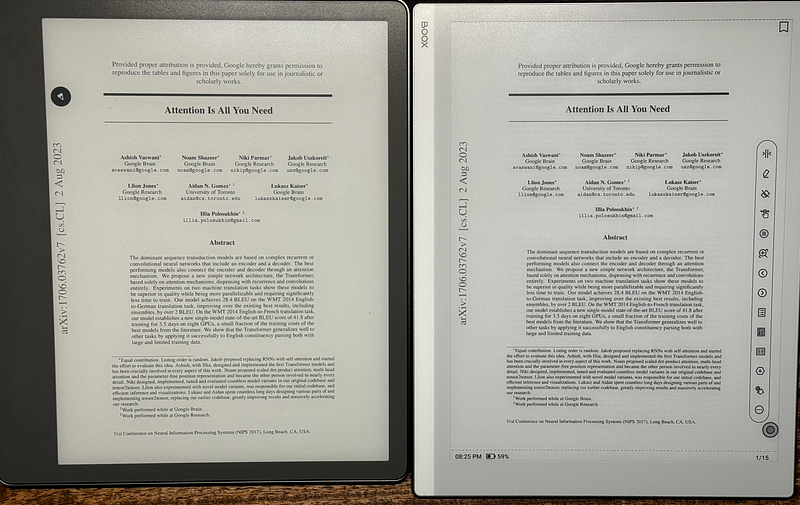
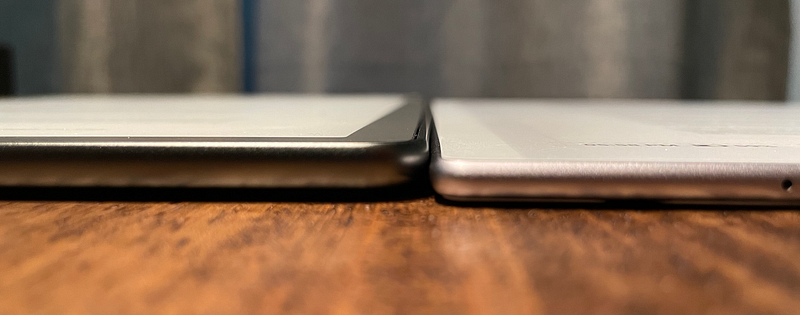
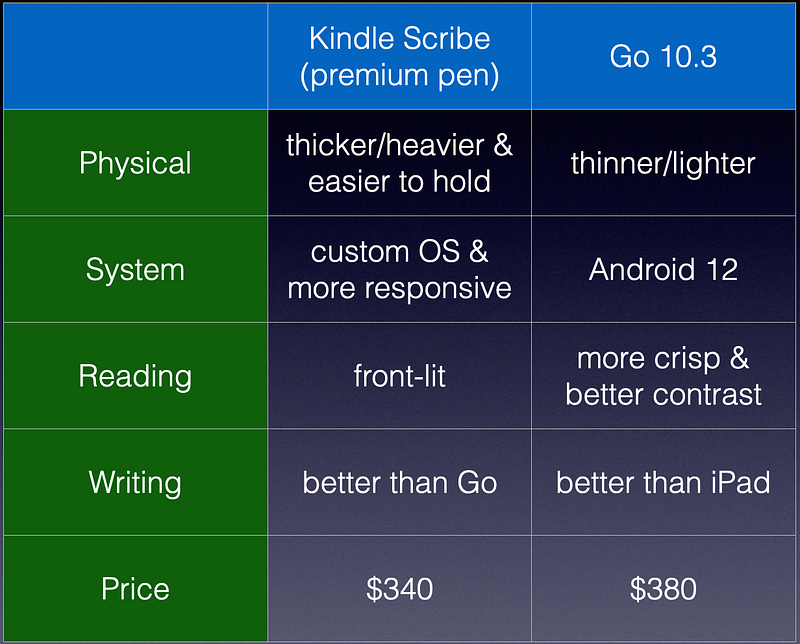
Kindle Scribe is a bit thicker and heavier than Go 10.3, but Kindle is more comfortable to grab and hold with its very large bezel on the left. Kindle Scribe is a bit fatter whereas Go 10.3 is a bit taller.
Screen
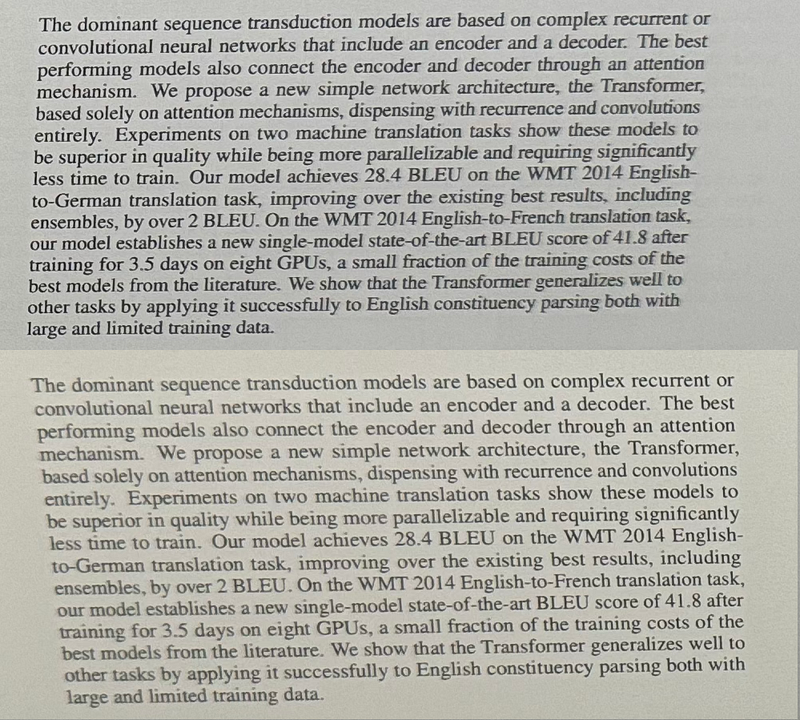
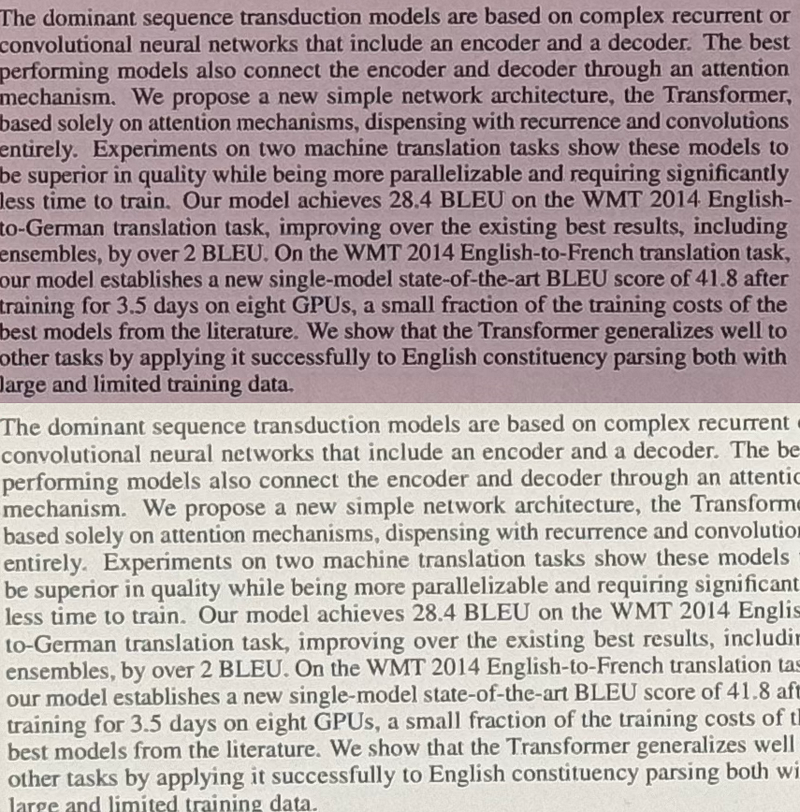
Kindle Scribe has green-ish tint compared to Go 10.3. Also, I found that text is noticeably crisper on Go 10.3 than Kindle Scribe. If, however, your ambient lighting is not so bright, then Kindle may be a better option, because Kindle has the front-light whereas Go 10.3 does not.
In fact, I purchased Go 10.3 first then Kindle later only because I found Go’s lack of front-lit display difficult to read under dim condition—I don’t like bright light, so my home is mostly too dim to read, except directly under the desk lamp.
However, I am debating to return Kindle because I found front-lit e-ink display neither improves crispiness nor contrast of text. I actually bought a small LED book light and attached it to my Go 10.3 to read in dim lighting condition. Believe it or not, I like it much better than using front-lit display of Kindle Scribe, but of course, your mileage may vary.
Software
Go 10.3 is running a very old Android (ver. 12) vs Kindle Scribe is running some custom Linux for the device. I found Kindle to be much more responsive than Go 10.3. However, there isn’t much I can do with Kindle other than reading Kindle books or PDFs, very basic and handicapped web-browsing, and taking notes. On the other hand, I can install and run any Android apps that I want, as long as the App supports the outdated Android version 12. With either device, be prepared for the higher latency and sluggishness compared to, say, iPad.
With Go 10.3, there is BooxDrop app that lets syncing files between a computer and Boox device extremely easy. One can also take advantage of 10GB free cloud storage provided by Onyx, the company behind Boox devices. I wouldn’t use this to transfer confidential or sensitive materials, but overall I find it really convenient to send PDFs to the Go 10.3 device from my laptop or computer.
With Kindle, one can setup a Kindle email account in Amazon.com, which lets one email PDFs directly to the device. This is not bad, but not as convenient as the Boox way of drag and drop.
Note taking
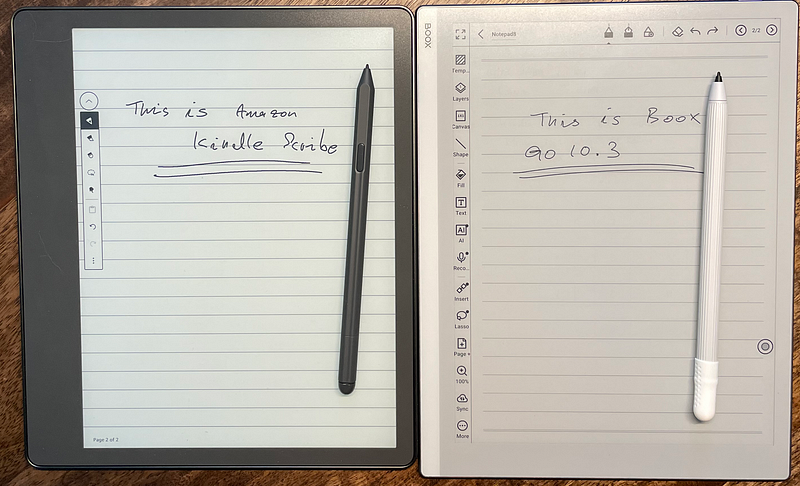
Being able to take a note was one of the main motivation when shopping for the device, but I have to admit that my main use case is now reading and not writing. Personally, I am not too satisfied with writing experience with neither of the devices. Don’t get me wrong—both devices provide much better writing experience compared to iPad. It feels more real-pencil-and-paper like to write on these devices than iPad, but just don’t expect it to be on par with real pencil-and-paper.
Note that Kindle Scribe has much more noticeable optical gap between the top panel and the actual display where e-ink sits. I suspect this is due to front-lit lighting. This gap makes it less ideal when writing.
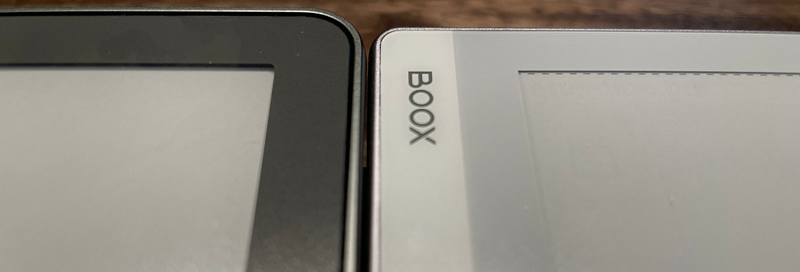
Despite the gap, however, I prefer the writing experience with the Kindle Scribe. Its front-lit screen makes so convenient to write in dark, and its pen—I bought the one with the premium pen—feels more solid and premium than the bundled pen from Go 10.3. The latency was noticeably shorter and the writing felt much smooth and snappy with Kindle Scribe than Go 10.3.
What I miss
I am told reMarkable offers a browser extension that converts a website into a PDF file. I am not sure what is the quality of the generated PDF through this way, but I wish Amazon and Onyx offer similar extension. I often find myself need to read a webpage that is not a PDF, and most of the time this forces me to read from a computer because reading a web content is really not ideal with either of the e-reader devices.
Conclusion
It really comes down to what your primary use case is with the device. If you are looking to read a lot with the device, especially with small text like PDF files, then Go 10.3 is a better choice thanks to its crisper screen. On the other hand, if your intention is to use more heavily towards writing notes, I’d say Kindle Scribe is a better option.
Disclaimer: I bought the devices with my own money. However, as an Amazon Associate I earn from qualifying purchases with the links below.
Amazon Kindle Scribe: https://amzn.to/3zKCbHA
Boox Go 10.3: https://amzn.to/3BCbeGD
Remarkable Pro: https://amzn.to/3U0Tf2M
Useful resources
Harvard Study Shows E Ink’s ePaper Is Up to Three Times Healthier for Your Eyes Than LCD Screens
E Ink (8069.TWO), the originator, pioneer, and global commercial leader in ePaper technology, announced today the…