Benchmark — macOS vs Asahi vs Virtualized Linux
Today, we are going to run simple CPU/IO benchmark on a M1 Macbook Pro running with
- macOS Sequoia 15.1
- Fedora Asahi Remix (native)
- Ubuntu 24.04 via Docker
- Ubuntu 24.04 via Parallels
- Ubuntu 24.04 via UTM
Macbook is great for general use like web-browsing, but I don’t like it too much when it comes to development, as it is not Linux. This means that there are tools that I can’t use on macOS, such as perf or taskset. There are basically two options to run Linux on Apple Silicon Mac: 1) native via Asahi Linux 2) virtualized Linux via Docker, Parallels, or UTM.
I wanted to test all of these options and compare the performance of each system with simple gzip decompression benchmark that heavily relies on both CPU and file IO. This will be an interesting test, since the hardware is exactly identical—M1 Macbook Pro—and only the OS/software are different.
Benchmark
What we will benchmark with is a series of gzip decompression test programs with different implementations.
- GNU gzip: this is shipped out of box on all Linux. macOS has an optimized version, so we will compile the GNU gzip from the source code to make sure we are testing exactly the same implementations
- Pigz: this is the multi-thread supported version of gzip by the same author. This program relies on zlib, but this again is optimized on macOS. Again, we will make sure to download both zlib and pigz from source and build from scratch for fair comparison
- Rust flate2: this is pure Rust implementation of gzip
- Rust gunzip: this is pure Rust implementation of gzip decompression that supports multi-thread
As the test is decompression, it requires intensive CPU workload as well file IO, in particular a lot of write. Each program will decompress 227MB Linux kernel tar.gz file into 1.4GB.
We will record the wall time along with the user time and system time. The wall time will correspond to the total runtime, while the user time and system time will record CPU-operation and the file IO operation time, respectively. You can find the benchmark script here.
Result and Discussion
All the times are measured in battery mode.
First, let’s look at the user runtime. This represents the time where the CPU has been working busy. Some interesting observations
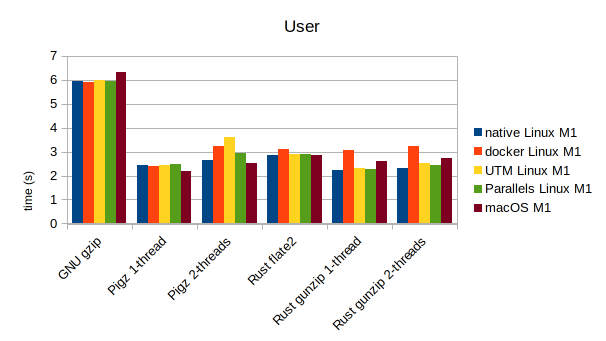
- There is not a single clear winner for all cases
- native Linux with Asahi seems to run more stable compared to virtualized Linux, having less fluctuations
- the fluctuations are more prominent with multi-threads, and I suspect due to performance/efficiency cores—more on this later
Next is system time, which is mostly spent reading and writing to the 1TB SSD.
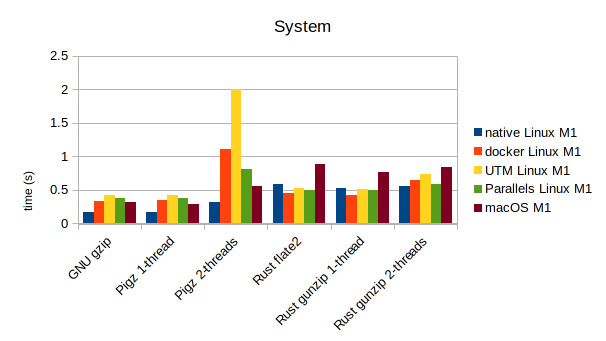
- Surprisingly, Asahi Linux shows better performance than macOS in most cases, especially with those programs written in C (gzip/pigz)
- macOS I/O is much slower for Rust programs compared to virtualized Linux systems. This is counter-intuitive because all I/O operations on virtualized environment must go through the macOS I/O, so it should only add overhead. I suspect the Rust’s I/O implementation is sub-optimal for macOS
Finally, below shows the real runtime (wall clock time)
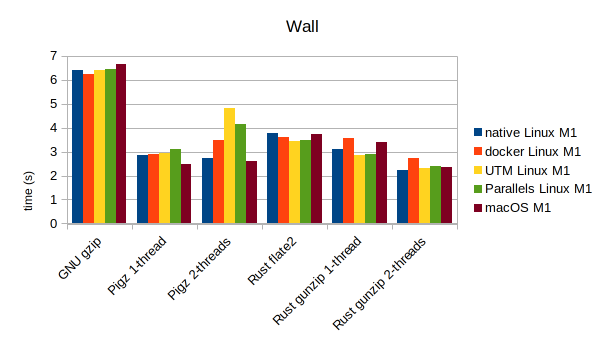
- pigz ran faster with single-thread vs two-threads in all cases, except for the native Asahi Linux. This is because only with native Linux I was able to force the programs to run on two performance cores via
taskset -c 4,5. This option won’t work for macOS or virtualized Linux, hence very likely running the second thread on slower efficiency-core. As a proof, I observed the same trend when I didn’t force performance core on native Linux - However, for Rust version we don’t observe this anymore—that is, for all systems the Rust gunzip with 2-threads consistently ran faster than 1-thread. This could be due to Rust’s unique feature of memory safety & currency that results in more efficient multi-threading implementation
Conclusion
I didn’t observe any obvious pattern on the performance difference between native Linux vs virtualized Linux vs macOS. Asahi Linux provides the native Linux experience but at the same lacks seamless hardware/software integration that Apple provides through macOS. The virtualized Linux environments also have their pros and cons, e.g., performance overhead due to virtualization layers can affect speed and responsiveness, but they offer greater flexibility in terms of software compatibility and ease of switching between operating systems. Additionally, virtualized environments can provide better isolation, which is beneficial for testing and development purposes. However, they may not fully leverage the hardware capabilities of Apple Silicon, unlike native installations such as Asahi Linux, which aim to optimize performance by directly interfacing with the hardware.
After all, the choice is yours.
Get Parallels for macOS (affiliate link) https://parallels.sjv.io/c/5855542/2224433/13842