Performance optimization — profile system calls
I have been working on my Rust gunzip project for some time. In particular I have been trying to optimize its speed. Recently, I reached a point where its user runtime was faster than pigz, but its system runtime was much slower. Today, I will share how I managed to track down the root cause and resolved it. You can find the full source code here.
Prerequisite
To follow along, you will need to run gdb, hyperfine, and strace commands. Make sure these programs are installed on your system. In addition, I will profile and compare pigz and Rust gunzip programs for demonstration, so it is recommended that you have these ready too.
# install necessary programs
sudo apt install -y hyperfine gdb strace pigz

# install Rust
curl --proto '=https' --tlsv1.2 -sSf https://sh.rustup.rs | sh

# build Rust gunzip version before system call optimization
git clone https://github.com/TechHara/gunzip.git -b 23
cd gunzip
cargo build -rq
cd ..
The idea is to measure system time it takes to decompress a file with pigz and gunzip respectively and figure out why one is faster than the other. For that, we will download and compress Linux kernel source code.
# download and compress linux kernel source code
curl -o- https://cdn.kernel.org/pub/linux/kernel/v6.x/linux-6.12.4.tar.xz | xz -d | gzip > linux.tar.gz
Benchmark
The most accurate tool for runtime benchmark is hyperfine.
# benchmark Rust gunzip and pigz decompression
hyperfine -w3 -r5 "gunzip/target/release/gunzip < linux.tar.gz > linux.tar" "pigz -d -p1 < linux.tar.gz > linux.tar"

Benchmark 1: gunzip/target/release/gunzip < linux.tar.gz > linux.tar
  Time (mean ± σ):      4.249 s ±  0.078 s    [User: 1.532 s, System: 2.331 s]
  Range (min … max):    4.110 s …  4.294 s    5 runs

Benchmark 2: pigz -d -p1 < linux.tar.gz > linux.tar
  Time (mean ± σ):      3.563 s ±  0.161 s    [User: 2.165 s, System: 1.076 s]
  Range (min … max):    3.277 s …  3.645 s    5 runs
As shown above, I obtained whopping 2.33s of system runtime on Rust gunzip whereas only 1.08s of system runtime on pigz. That is more than 2x time spent with Rust gunzip while doing the same system task, i.e., reading and writing files.
System call tracer
To track down the issue, we can utilize Linux tool strace. First, let’s count system calls when running the programs using strace -c option. Below shows the output with Rust gunzip
strace -c gunzip/target/release/gunzip < linux.tar.gz > linux.tar

% time     seconds  usecs/call     calls    errors syscall
------ ----------- ----------- --------- --------- ------------------
 97.70    2.083998           5    372830           write
  2.25    0.047983           3     14958           read
  0.02    0.000375         375         1           execve
...
------ ----------- ----------- --------- --------- ------------------
100.00    2.133081           5    387847         1 total
and with pigz
% time     seconds  usecs/call     calls    errors syscall
------ ----------- ----------- --------- --------- ----------------
 94.57    0.311529           6     47190           write
  5.26    0.017316           2      7480           read
  0.07    0.000238          12        19           mmap
...
------ ----------- ----------- --------- --------- ----------------
100.00    0.329416           6     54726         1 total
Comparing the two counts, we can immediately see the problem lies with write call. With Rust gunzip, we call this function 372k times while with pigz we call the same function only 47k times, roughly 9x fewer times, resulting in around 2.08s vs 0.31s, respectively.
Now, let’s examine write calls within these two programs using strace -f option.
# gunzip
strace -f -e write -o strace.gunzip gunzip/target/release/gunzip < linux.tar.gz > linux.tar
head strace.gunzip

543515 write(1, "pax_global_header\0\0\0\0\0\0\0\0\0\0\0\0\0\0\0"..., 8185) = 8185
543515 write(1, "  - 'ds", 7)           = 7
543515 write(1, "a_switch_for_each_port_continue_"..., 8175) = 8175
543515 write(1, "  - 'hlist_bl_for", 17) = 17
543515 write(1, "_each_entry_rcu'\n  - 'hlist_bl_f"..., 8187) = 8187
543515 write(1, "Space", 5)             = 5
543515 write(1, "BeforeParens: ControlStatementsE"..., 7798) = 7798
543515 write(1, "\0\0\0\0\0\0\0\0\0\0\0\0\0\0\0\0\0\0\0\0\0\0\0\0\0\0\0\0\0\0\0\0"..., 394) = 394
543515 write(1, "linux-6.12.4/.mailmap\0\0\0\0\0\0\0\0\0\0\0"..., 8142) = 8142
543515 write(1, "Bryan Tan <bryan-bt.tan@broadcom"..., 50) = 50

# pigz
strace -f -e write -o strace.pigz pigz -d -p1 < linux.tar.gz > linux.tar
head strace.pigz

544353 write(1, "pax_global_header\0\0\0\0\0\0\0\0\0\0\0\0\0\0\0"..., 32768) = 32768
544353 write(1, "linux-6.12.4/.mailmap\0\0\0\0\0\0\0\0\0\0\0"..., 32768) = 32768
544353 write(1, "sisk.pl>\nRajeev Nandan <quic_raj"..., 32768) = 32768
544353 write(1, "\303\256t Cousson\nE: bcousson@baylibre"..., 32768) = 32768
544353 write(1, "Serial IrDA driver\nD: USB Blueto"..., 32768) = 32768
544353 write(1, "0\nS: Beaverton, Oregon 97008\nS: "..., 32768) = 32768
544353 write(1, "sys/.../iio:deviceX/scan_element"..., 32768) = 32768
544353 write(1, "\tStefan Achatz <erazor_de@users."..., 32768) = 32768
544353 write(1, "What:\t\t/sys/bus/usb/devices/<bus"..., 32768) = 32768
544353 write(1, " did not provide\n\tasynchronous I"..., 32768) = 32768
We see the arguments to each write call. There are two main differences between the two
Rust gunzipwrites in max chunk size of 8k bytes, whilepigzwrites in chunk of 32k bytes exactlyRust gunzipwrites 8k bytes in twowritecalls
These two differences result in 4x and 2x more write calls for Rust gunzip, yielding 8x more frequent calls to write() function. This roughly matches what we observed with strace -c command above.
Locate in source
To locate the source line, use gdb with command catch syscall write as shown below
gdb -q program
(gdb) catch syscall write
(gdb) r [args..]
(gdb) bt
This will result in the following for Rust gunzip
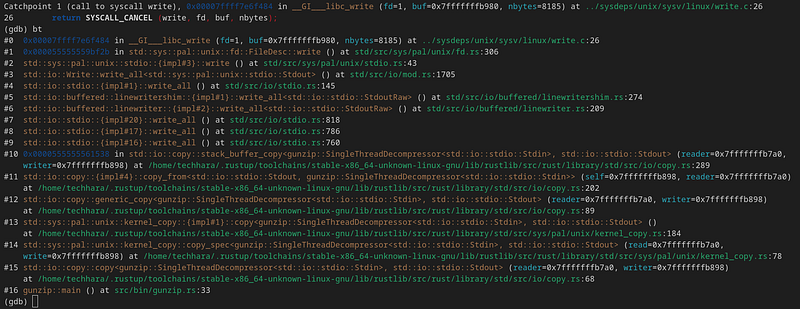
As the backtrace implies, the write call can be traced back to std::io::copy(..., std::io::stdio::Stdout) call as in #15. That is, we are writing to stdout through std::io::stdout(). This is where we are getting ~8k bytes of chunk size, as std::io::copy() by default uses 8k bytes of buffer. In order to match what pigz does, we want to increase the buffer to 32k bytes — this can be achieved by supplying BufWrite with buffer size of 32kB. Before we do this, there is something else we need to consider.
Notice what #6 says
#6 std::io::buffered::linewriter::{impl#2}::write_all<std::io::stdio::StdoutRaw> () at std/src/io/buffered/linewriter.rs:209
We are writing to stdout with LineWriter. This is not we want as LineWriter flushes every time a newline is detected. Since we are dealing with any data, not just text data, what we want is BufWriter that flushes only when the buffer is full. Using LineWriter will impose unnecessary overhead with more frequent system calls and newline character search.
Unfortunately, Rust’s std::io::stdout() returns LineWriter and as of now (source) and there is no safe way to instantiate Stdout without LineWriter. However, there is a trick that works for unix-family operating systems —use std::fs::File and write to /dev/stdout.
Patch
So, combining these two changes, let’s apply the following patch to src/bin/gunzip.rs file of our Rust gunzip project
--- before
+++ after
@@ -23,7 +23,7 @@ fn main() -> std::io::Result<()> {
     };

     let reader = std::io::stdin();
-    let mut writer = std::io::stdout();
+    let mut writer = std::io::BufWriter::with_capacity(32768, get_stdout()?);

     if multithread {
         let mut decompressor = MultithreadDecompressor::new(reader);
@@ -35,3 +35,13 @@ fn main() -> std::io::Result<()> {

     Ok(())
 }
+
+#[cfg(unix)]
+fn get_stdout() -> std::io::Result<impl std::io::Write> {
+    std::fs::File::create("/dev/stdout")
+}
+
+#[cfg(windows)]
+fn get_stdout() -> std::io::Result<impl std::io::Write> {
+    Ok(std::io::stdout())
+}
Now, let’s compile and re-run strace -c
% time     seconds  usecs/call     calls    errors syscall
------ ----------- ----------- --------- --------- ------------------
 66.66    0.263365           5     47190           write
 26.71    0.105539       21107         5           close
  6.42    0.025345           1     14958           read
...
------ ----------- ----------- --------- --------- ------------------
100.00    0.395071           6     62208         1 total
The write call counts have reduced to 47k from 373k. Let’s now re-run the benchmark with hyperfine
Benchmark 1: gunzip/target/release/gunzip < linux.tar.gz > linux.tar
  Time (mean ± σ):      2.890 s ±  0.026 s    [User: 1.500 s, System: 1.013 s]
  Range (min … max):    2.845 s …  2.909 s    5 runs

Benchmark 2: pigz -d -p1 < linux.tar.gz > linux.tar
  Time (mean ± σ):      3.558 s ±  0.026 s    [User: 2.128 s, System: 1.032 s]
  Range (min … max):    3.524 s …  3.589 s    5 runs
Viola! Not only were we able to reduce the system runtime from 2.3s to 1.0s (comparable to pigz), but we were also able to reduce user runtime from 1.5s to 1.4s — this is most likely because we got rid of unnecessary LineWriter that had to search for newline character. With this change, it now takes our Rust gunzip program only 2.9s to decompress Linux source code, a significant speed up from the original runtime of 4.2s, while pigz manages to the same in 3.5s.
In summary, I was able to boost Rust gunzip performance by whopping 40% just from profiling and optimizing its system calls. Hopefully my experience can help other devs optimize their programs as well.