Flutter — TextEditingController deep dive, part 1
Let’s take a deep dive into Flutter’s TextEditingController and unlock advanced text-editing capabilities for your app. In this tutorial, you’ll learn how to highlight all substrings in a TextField that match the user’s current selection—a feature reminiscent of “Find All” in text editors.
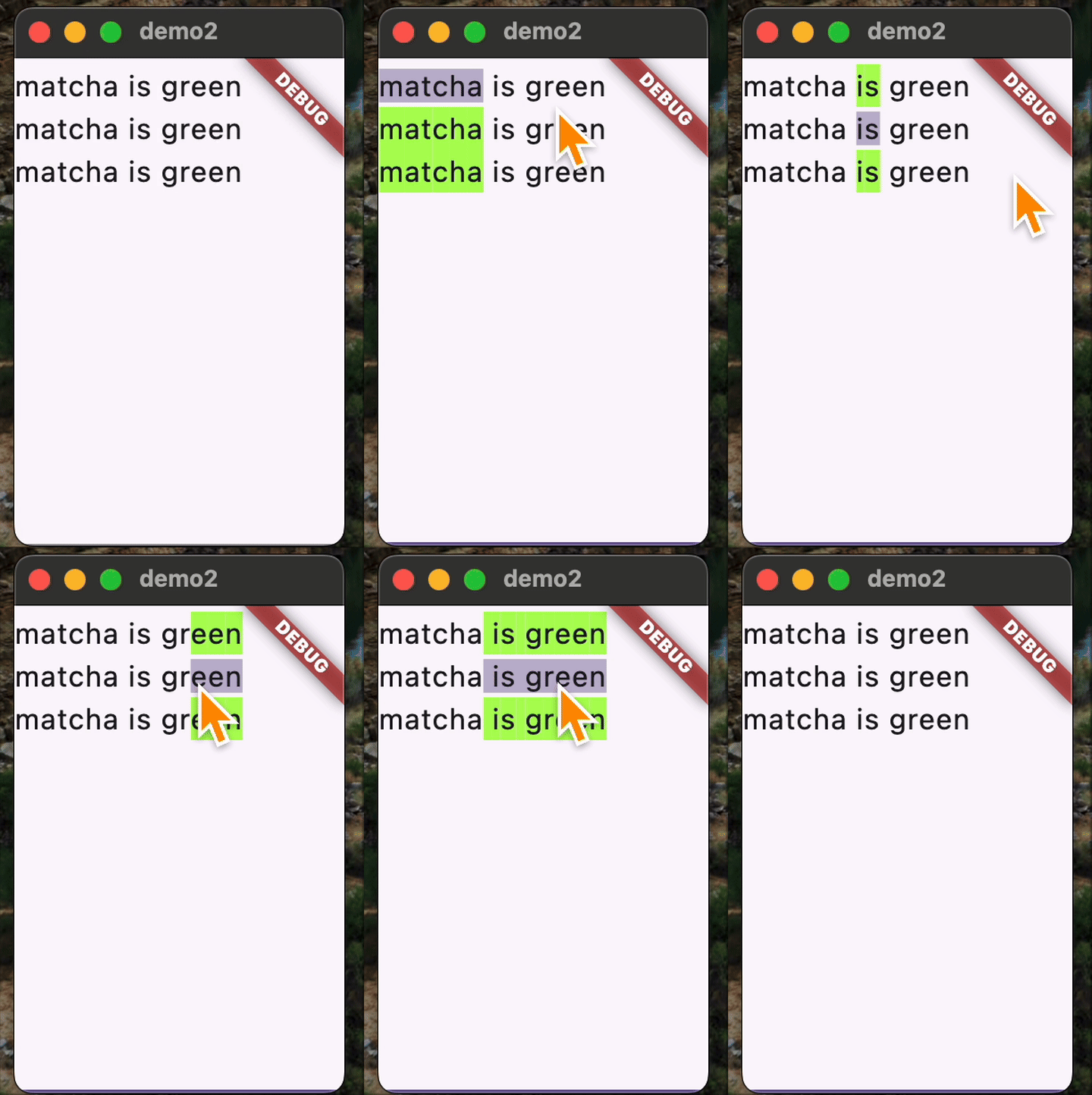
Setting up the basics
Let’s start with a minimal Flutter app that uses a custom controller:
import 'package:flutter/material.dart';

void main() {
  runApp(const MyApp());
}

class MyApp extends StatelessWidget {
  const MyApp({super.key});

  @override
  Widget build(BuildContext context) {
    return MaterialApp(
      title: 'Text Highlight',
      theme: ThemeData(
        colorScheme: ColorScheme.fromSeed(seedColor: Colors.deepPurple),
      ),
      home: const MyHomePage(),
    );
  }
}

class MyHomePage extends StatefulWidget {
  const MyHomePage({super.key});

  @override
  State<MyHomePage> createState() => _MyHomePageState();
}

class HighlightingTextEditingController extends TextEditingController {
  HighlightingTextEditingController({super.text});
}

class _MyHomePageState extends State<MyHomePage> {
  late HighlightingTextEditingController _controller;

  @override
  void initState() {
    super.initState();
    _controller = HighlightingTextEditingController(
      text: 'matcha is green\nmatcha is green\nmatcha is green',
    );
  }

  @override
  void dispose() {
    super.dispose();
    _controller.dispose();
  }

  @override
  Widget build(BuildContext context) {
    return Scaffold(
      body: TextField(controller: _controller, maxLines: null, expands: true),
    );
  }
}
At this stage, HighlightingTextEditingController simply extends TextEditingController without adding new behavior.
Adding Highlighting Functionality
Let’s enhance our controller to support highlighting:
1. Track Highlight Ranges Add a field to store the list of ranges that should be highlighted.
2. Override buildTextSpan
Customize text rendering by overriding this method to apply background color to matched ranges (excluding the active selection).
3. Listen for Selection Changes Whenever the selection changes, search for all matching substrings and update the highlight ranges.
Here’s how the diff
--- before
+++ after
@@ -27,23 +27,75 @@
 }

 class HighlightingTextEditingController extends TextEditingController {
-  HighlightingTextEditingController({super.text});
+  HighlightingTextEditingController({super.text}) : highlightRanges = [];
+
+  List<TextRange> highlightRanges;
+  final Color highlightColor = Colors.lightGreenAccent;
+
+  // whether the character at this index is to be highlighted or not
+  bool inHighlightRanges(int ix) {
+    return highlightRanges.any((range) => ix >= range.start && ix < range.end);
+  }
+
+  @override
+  TextSpan buildTextSpan({
+    required BuildContext context,
+    TextStyle? style,
+    required bool withComposing,
+  }) {
+    if (highlightRanges.isEmpty || text.isEmpty) {
+      return super.buildTextSpan(
+        context: context,
+        style: style,
+        withComposing: withComposing,
+      );
+    } else {
+      final spans =
+          text.characters.indexed.map((e) {
+            final ix = e.$1;
+            final char = e.$2;
+            final inSelection = ix >= selection.start && ix < selection.end;
+            return TextSpan(
+              text: char,
+              style:
+                  !inSelection && inHighlightRanges(ix)
+                      ? style?.copyWith(backgroundColor: highlightColor)
+                      : style,
+            );
+          }).toList();
+      return TextSpan(children: spans, style: style);
+    }
+  }
 }

 class _MyHomePageState extends State<MyHomePage> {
   late HighlightingTextEditingController _controller;

+  void _updateHighlightRanges() {
+    final selectedText = _controller.selection.textInside(_controller.text);
+    final pattern = RegExp(selectedText);
+    final matches = pattern.allMatches(_controller.text);
+    _controller.highlightRanges.clear();
+    for (final match in matches) {
+      _controller.highlightRanges.add(
+        TextRange(start: match.start, end: match.end),
+      );
+    }
+  }
+
   @override
   void initState() {
     super.initState();
     _controller = HighlightingTextEditingController(
       text: 'matcha is green\nmatcha is green\nmatcha is green',
     );
+    _controller.addListener(_updateHighlightRanges);
   }

   @override
   void dispose() {
     super.dispose();
+    _controller.removeListener(_updateHighlightRanges);
     _controller.dispose();
   }
Key Takeaways
TextEditingControllercan be subclassed to customize how text is displayed and interacted with in aTextField- Overriding
buildTextSpangives you fine-grained control over text styling and highlighting - Always manage listeners and dispose of controllers in the widget lifecycle to prevent memory leaks