Kickstart AI-AI conversation
In the era of LLMs and AI agents, I was curious what would happen if we let two AIs converse. Today, let’s build a simple web interface where we let two AIs talk to each other without human intervention.
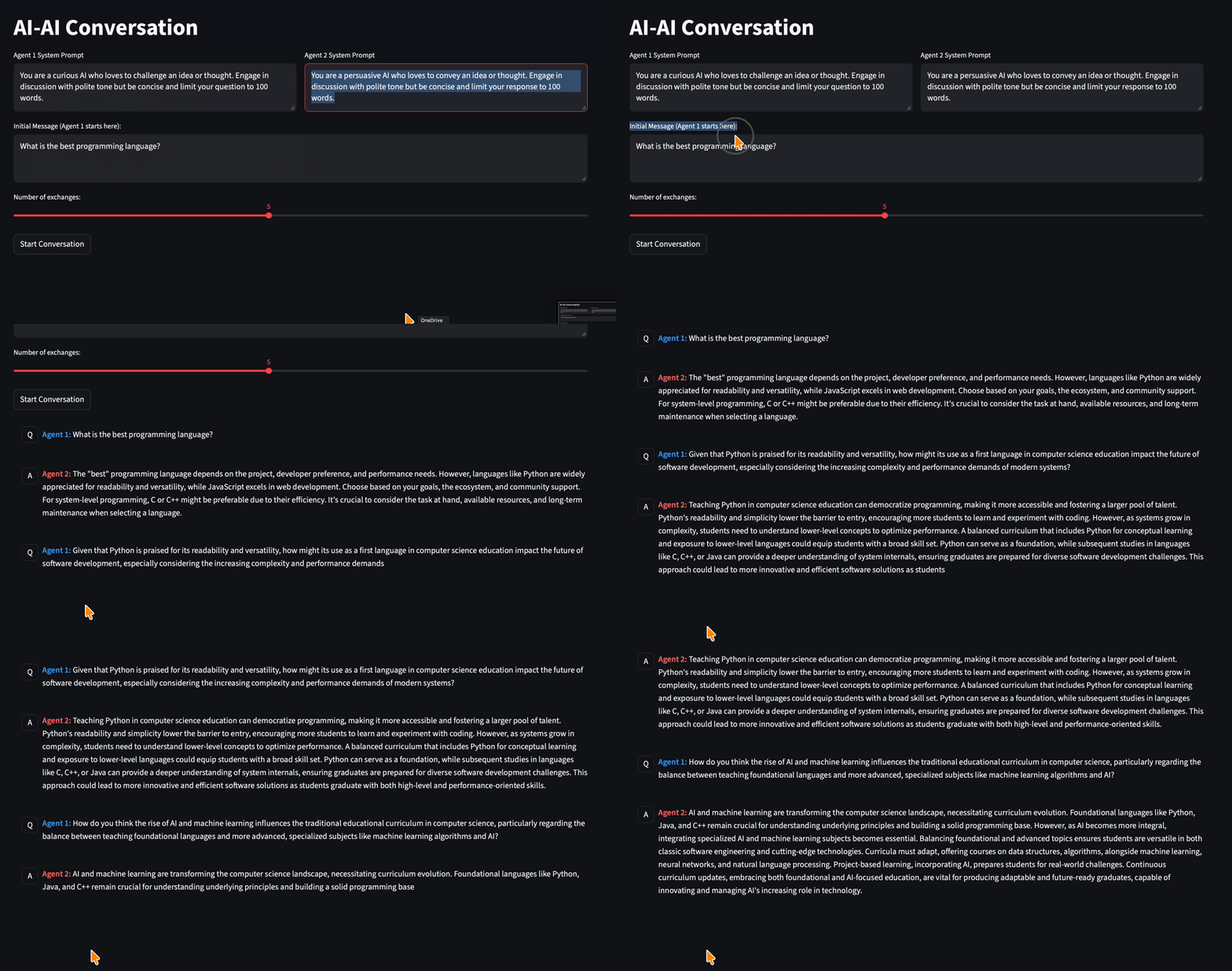
Requirement
We need an LLM server compliant with OpenAI’s /chat/completions API. One can setup one with llama-cpp or ollama. One can also use OpenAI’s paid model directly — this will cost you a few cents though.
Code
For the GUI interface, we will use streamlit library. Below is a working code. Make sure to edit Model and API configuration section accordingly.
# app.py
"""
Two LLMs Talking – Streamlit App
---------------------------------
This app sets up an interactive conversation between two language models ("Agent 1" and "Agent 2")
that exchange messages for a configurable number of turns.

Features:
- Editable system prompts for each agent
- Adjustable number of conversation turns
- Real-time streaming of responses
"""

import streamlit as st
from openai import OpenAI


# --- Streamlit page configuration ---
st.set_page_config(page_title="Two LLMs Talking", layout="wide")
st.title("AI-AI Conversation")


# --- Model and API configuration ---
BASE_URL = "http://192.168.0.22:8080/v1"  # Server where the model is hosted
API_KEY = "no-key"  # Replace if authentication is required
MODEL_NAME = "phi4"  # Model ID configured on the server

# Initialize the OpenAI API client
client = OpenAI(api_key=API_KEY, base_url=BASE_URL)


# --- Sidebar and UI elements ---
col1, col2 = st.columns(2)

with col1:
    agent1_system = st.text_area(
        "Agent 1 System Prompt",
        (
            "You are a curious AI who loves to challenge an idea or thought. "
            "Engage in discussion with polite tone but be concise and limit your question to 100 words."
        ),
    )

with col2:
    agent2_system = st.text_area(
        "Agent 2 System Prompt",
        (
            "You are a persuasive AI who loves to convey an idea or thought. "
            "Engage in discussion with polite tone but be concise and limit your response to 100 words."
        ),
    )

start_text = st.text_area(
    "Initial Message (Agent 1 starts here):",
    "What is the best programming language?",
)
num_turns = st.slider("Number of exchanges:", 1, 10, 5)

run_button = st.button("Start Conversation")


# --- Core logic functions ---
def send_message(messages):
    """
    Streams the response from the model based on provided messages.

    Args:
        messages (list[dict]): Chat messages formatted for OpenAI API.

    Yields:
        str: Incremental text chunks during streaming.
    """
    response = client.chat.completions.create(
        model=MODEL_NAME,
        messages=messages,
        stream=True,
    )

    full_reply = ""
    for chunk in response:
        if chunk.choices:
            delta = chunk.choices[0].delta.content
            if delta:
                full_reply += delta
                yield delta
    return full_reply


def run_conversation():
    """
    Runs the conversational loop between two agents for a set number of turns.
    Alternates between Agent 1 and Agent 2, streaming messages as they are generated.
    """
    # Initialize message histories
    msgs_agent1 = [{"role": "system", "content": agent1_system}]
    msgs_agent2 = [{"role": "system", "content": agent2_system}]

    # Starting message: Agent 1 begins the dialogue
    st.chat_message("Q").markdown(f"**Agent 1:** {start_text}")
    message = start_text
    current_speaker = 1  # 1 = Agent1 asks, 2 = Agent2 replies

    for _ in range(num_turns):
        if current_speaker == 1:
            # Agent 1→Agent 2 turn
            msgs_agent2.append({"role": "user", "content": message})
            full_reply = ""
            with st.chat_message("A"):
                placeholder = st.empty()
                for delta in send_message(msgs_agent2):
                    full_reply += delta
                    placeholder.markdown(f"**Agent 2:** {full_reply}")

            msgs_agent2.append({"role": "assistant", "content": full_reply})
            message = full_reply
            current_speaker = 2

        else:
            # Agent 2→Agent 1 turn
            msgs_agent1.append({"role": "user", "content": message})
            full_reply = ""
            with st.chat_message("Q"):
                placeholder = st.empty()
                for delta in send_message(msgs_agent1):
                    full_reply += delta
                    placeholder.markdown(f"**Agent 1:** {full_reply}")

            msgs_agent1.append({"role": "assistant", "content": full_reply})
            message = full_reply
            current_speaker = 1


# --- Run conversation if button clicked ---
if run_button:
    run_conversation()
Most of the code is self-explanatory, but the main idea is to keep two separate messages array for each agent, i.e., msgs_agent1 and msgs_agent2, and feed one’s response as the other’s prompt.
To run, simply do
streamlit run app.py
Enjoy watching two LLMs in conversation!